Products · DLQ Manager · Encrypted messages

An encrypted dead-letter, read by the right person, on record

Some suppliers encrypt their events with AES-256 before they reach Service Bus - an electronics retailer's supplier does exactly that. When such a message dead-letters, the operator sees ciphertext and has to find a developer with the key. DLQ Manager decrypts one message on request, for the people you choose, with a key nobody can read back - and resends the original encrypted message.

Part of the Enterprise plan.

Keys that cannot be read back

A key is set once and never shown again - not to an administrator, not through any API or page. Only an 8-character check value proves which key it is.

Your vault, or a dedicated one

Keep the key in your own Azure Key Vault and revoke it any time, or hand it to OpsChisel's customer-secrets vault, separate from the platform's own secrets.

Only the people you name

Decrypting is its own permission. A tenant administrator does not get it automatically and can never grant it to themselves - another administrator has to; grants can be scoped down to a single queue or subscription.

Proven before it is saved

A profile can only be saved after it has decrypted a real dead-letter of that entity - a wrong layout is caught at set-up, not on a busy night.

In memory, on record

One message at a time, on request, in memory - never stored, never indexed. Every decrypted view is in the audit log; a resend sends the original encrypted message.

1 · Grant the right people

Decryption has two separate actions: manage decryption keys, for the people who set keys and layouts, and view decrypted payloads, for the people who read the messages - an on-call group, for one entity. Managing keys does not let anyone read messages, and reading does not let anyone change keys.

  • Not part of Tenant administrator - and never self-granted. Both actions are left out of the Tenant administrator role; only a tenant-level administrator can hand them out, never to themselves (four eyes: a second administrator makes that grant, moves it between groups, or adds the action to a role the first one holds), and every grant is audited.
  • Two built-in roles. CryptoAdmin manages keys and profiles and cannot read messages; PayloadDecryptor reads decrypted messages and manages no keys.
  • Custom roles can carry them. Put the actions in a role of your own - the editor groups every action by area, with a search box - and grant it for the whole tenant, a namespace or a single queue or subscription.
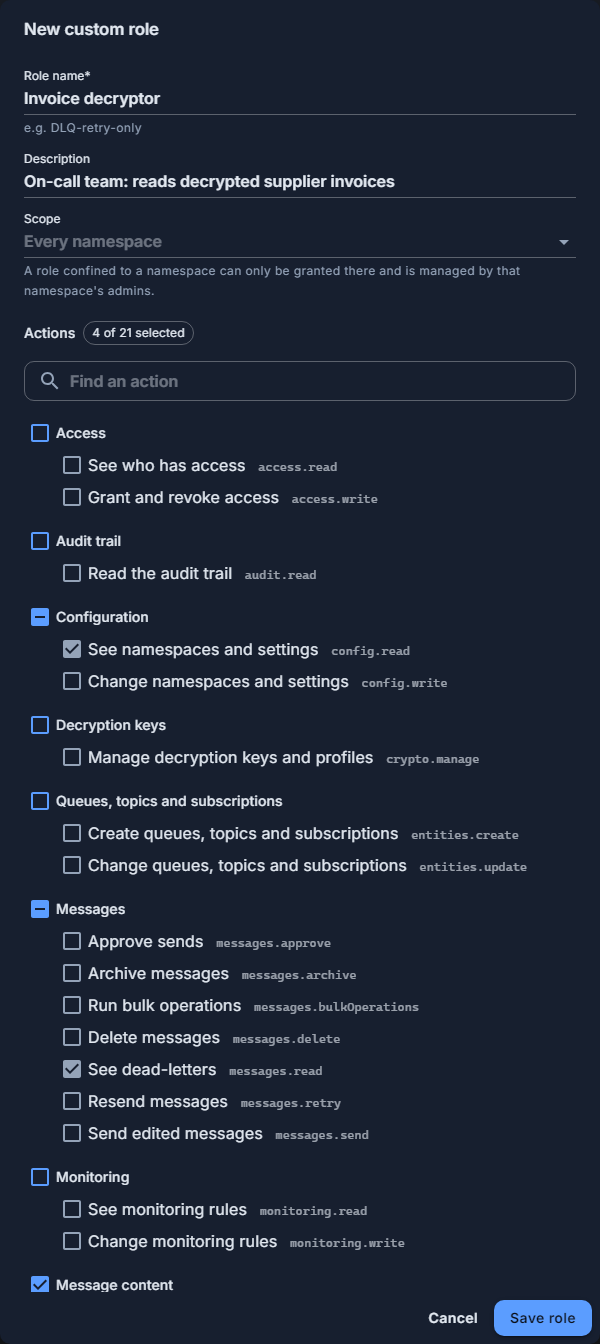
The custom role editor: a role named Invoice decryptor, 4 of 21 actions selected, the actions grouped by area - Access, Audit trail, Configuration, Decryption keys, Queues topics and subscriptions, Messages, Monitoring, Message content - each with a readable name and its technical id; See namespaces and settings, See dead-letters and the Message content actions are ticked
Step 1: a custom role carrying the two decryption actions, granted only where it is needed.

2 · Describe how the producer packs it

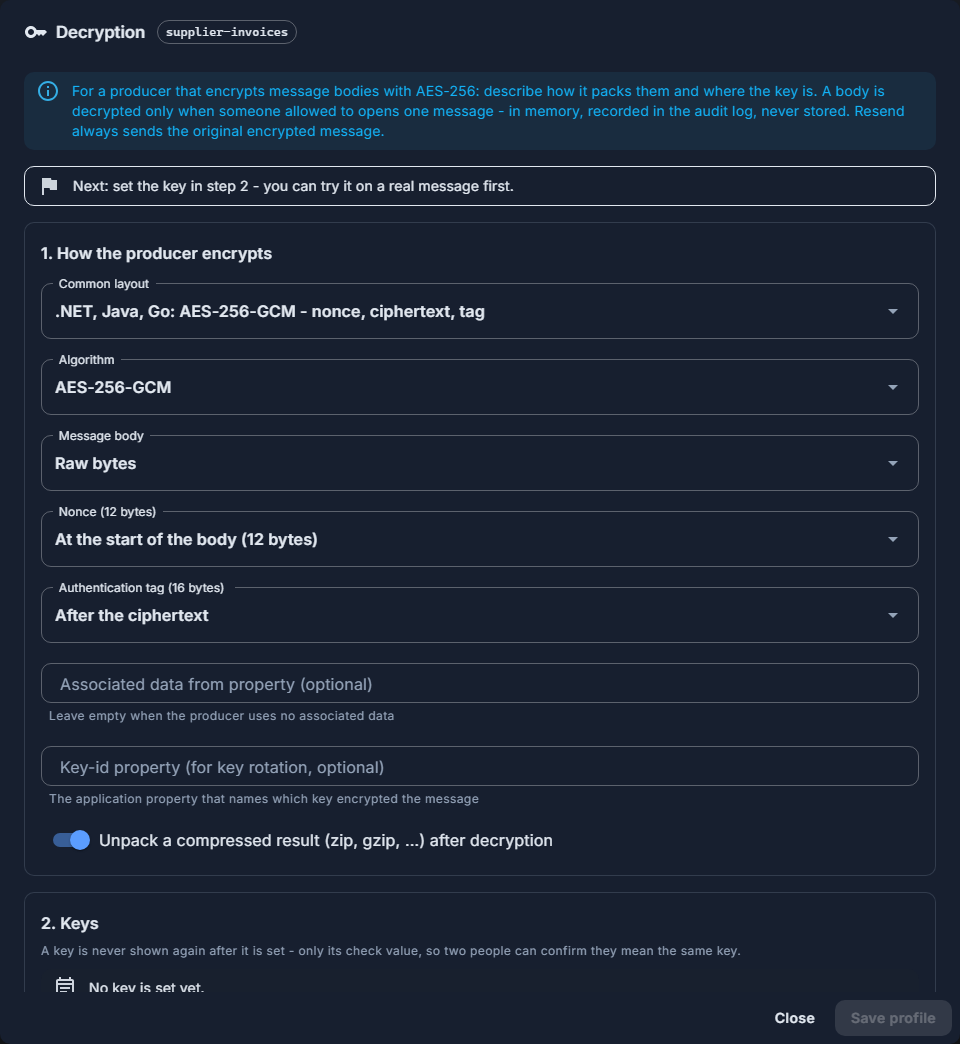
Ciphertext looks random, so nothing can be detected - and every producer packs AES a little differently. Describe it once per entity in a decryption profile. Press the key button on the entity's row, and the dialog starts with the layout: pick a ready-made preset, or set each part yourself.

PresetLayout
.NET, Java, Gononce | ciphertext | tag (AES-256-GCM)
Node.jsnonce | tag | ciphertext (AES-256-GCM)
CBC with IV firstIV | ciphertext (AES-256-CBC, PKCS7)
CBC + HMACIV | ciphertext | MAC (encrypt-then-MAC)
  • Custom when you need it. The nonce or IV from the start of the body or from an application property (Base64 or hex), the tag position, associated data from a property, the HMAC length (32 or 16 bytes) and what it covers, the order of a 64-byte key, and a body of raw bytes or Base64 text.
  • Key rotation. An application property can name the key that encrypted each message, so an entity can hold several keys while a producer rotates.
The key dialog at step 1 of 3, the layout: the presets '.NET, Java, Go: nonce | ciphertext | tag', 'Node.js: nonce | tag | ciphertext', 'CBC with IV first' and 'CBC + HMAC' in one column, the first selected, with the algorithm AES-256-GCM and the nonce, ciphertext and tag positions shown below
Step 2: the layout - a preset for the common cases, every part adjustable.

3 · Point at the key

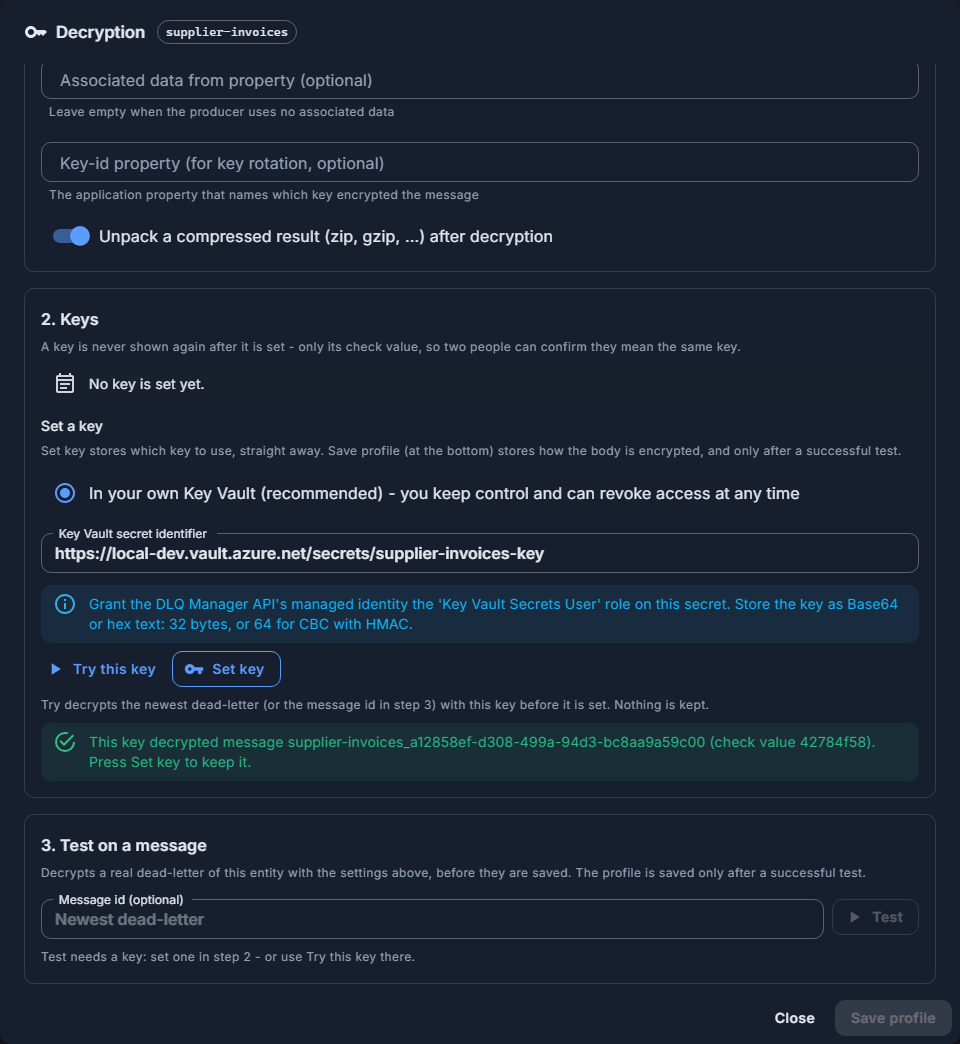
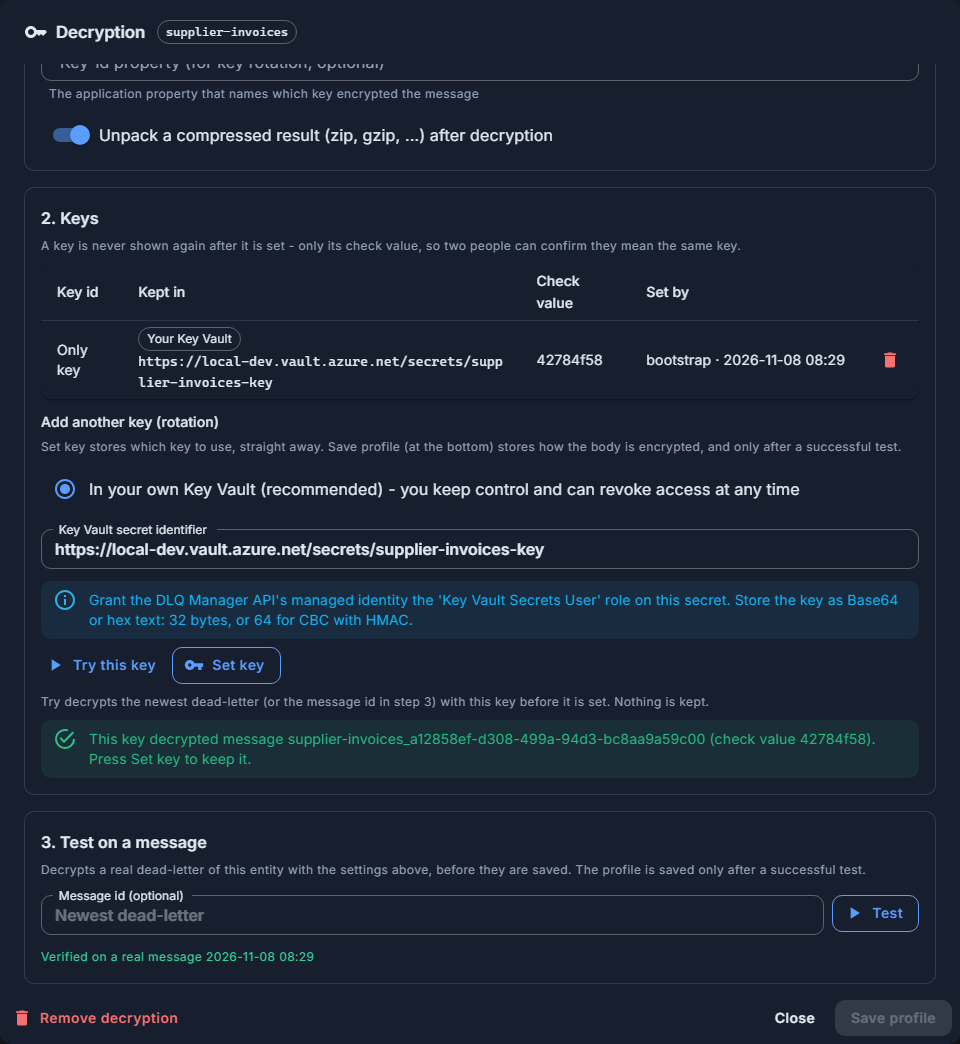
The recommended way: keep the key in your own Azure Key Vault. Paste the secret identifier and grant DLQ Manager's identity Key Vault Secrets User on that one secret. Press Try this key and the key is tried on a real dead-letter before it is set - nothing is stored by trying.

  • You keep control. Remove the role assignment and decryption stops within five minutes; your Key Vault logs every read. A reference can only name a Key Vault of yours - never one of OpsChisel's own.
  • Or let OpsChisel keep it. Paste the key once into a write-only field; it is stored in a dedicated customer-secrets vault and never returned.
The key dialog at step 2 of 3, the key: no key set yet, 'Your own Key Vault (recommended)' selected, a Key Vault secret identifier pasted in, and the result of Try this key - the key decrypted a real dead-letter of this entity, with its 8-character check value, and Set key to keep it; Test below says it needs a key first
Step 3: your Key Vault secret identifier, tried on a real message before it is set.

4 · Prove it on a real message

Press Test and the profile decrypts a real dead-letter of that entity. Only then can you press Save profile: a profile that has not decrypted a real message cannot be saved. The dialog shows where you are - layout, key, test - and Save finishes it.

  • A check value, not a key. The result shows the key's 8-character check value, so two people can confirm they mean the same key without either seeing it.
  • Setting keys asks for an extra sign-in. Changing keys and profiles is administration, and your organization's extra sign-in step applies.
The key dialog at step 3 of 3, the test: the message tested, 'Decrypted' with the first lines of the decrypted JSON, the key's check value, and the Save profile button enabled
Step 4: tested on a real dead-letter, with the key's check value - now Save profile is open.

5 · Read the dead-letter

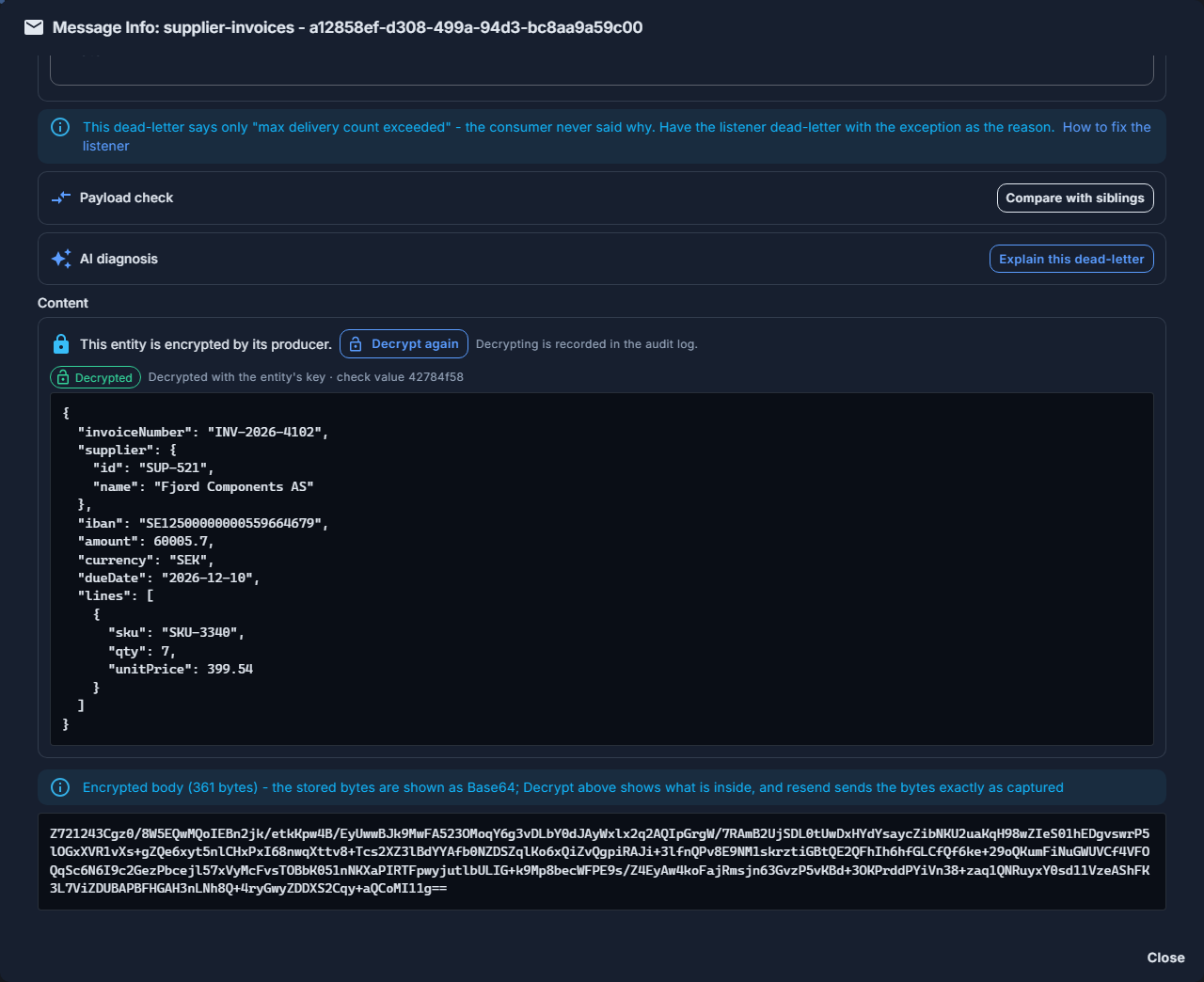
Open a message of a configured entity and press Decrypt. The decrypted content is shown for that view, formatted for reading - in memory, never stored, never indexed. People without the permission see the ciphertext and why.

  • One generic sentence on failure. When a message cannot be decrypted, the answer gives no hint which step failed - nothing for an attacker to learn from.
  • Slowed after repeated failures. At most 20 failed attempts per person in 10 minutes - and at most 100 per entity in 10 minutes, whoever tries, so many accounts cannot add up against one key.
Message details for an encrypted dead-letter: 'This entity is encrypted by its producer', the Decrypt again button, 'Decrypted with the entity's key · check value 42784f58', the decrypted invoice JSON formatted below, and under it the stored encrypted bytes with the note that resend sends them exactly as captured
Step 5: Decrypt in message details - the event the supplier sent, readable.

6 · Decrypt, then unzip

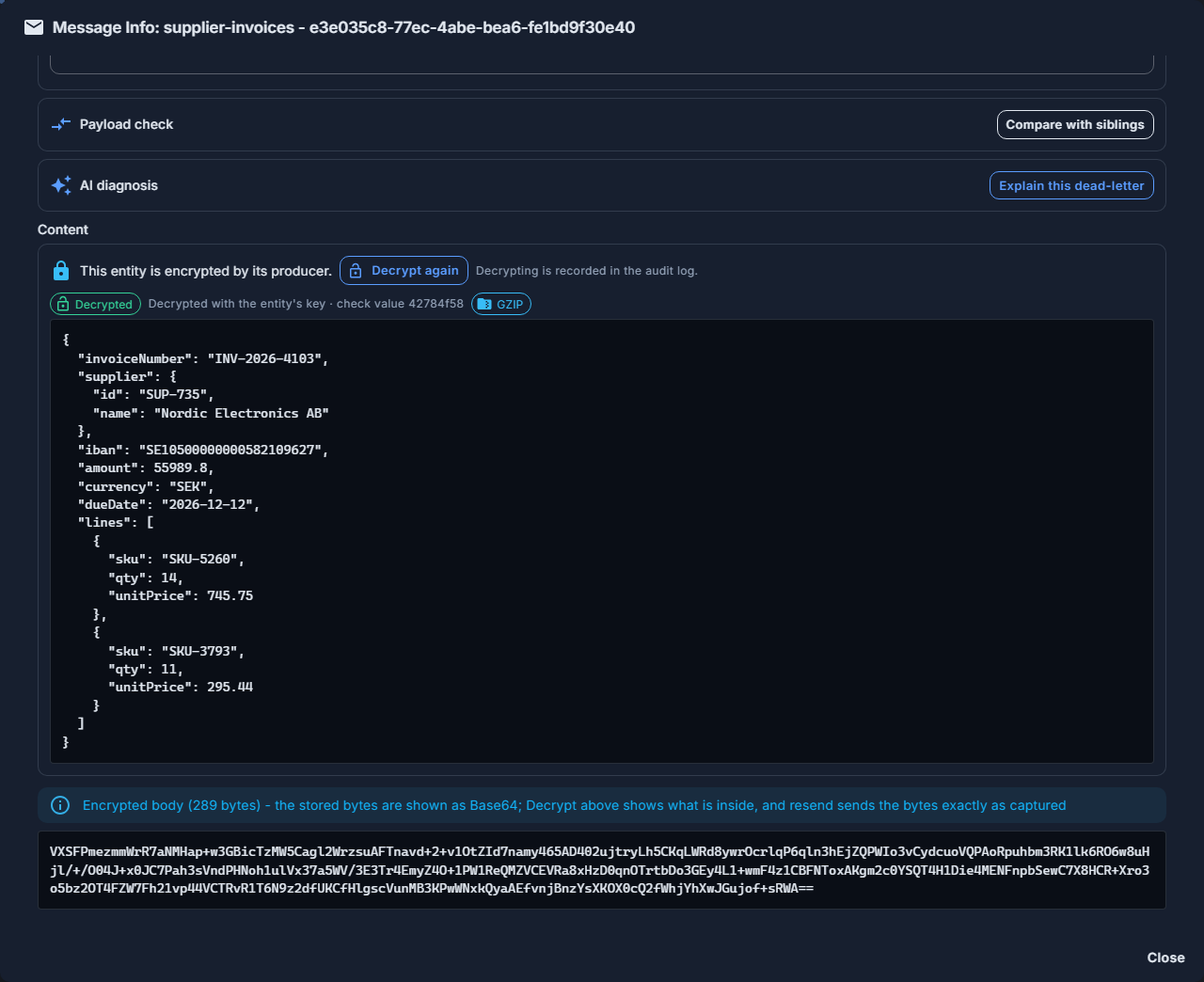
Some producers compress before they encrypt. When the decrypted content is itself a zip or gzip, it is unpacked in the same view, with the same limits as any compressed message.

Message details for an encrypted dead-letter whose decrypted content is a gzip file: the decryption banner, the compression banner, and the unpacked JSON below
Step 6: decrypted, then unpacked - the JSON inside a gzip inside AES-256.

7 · Every view on record

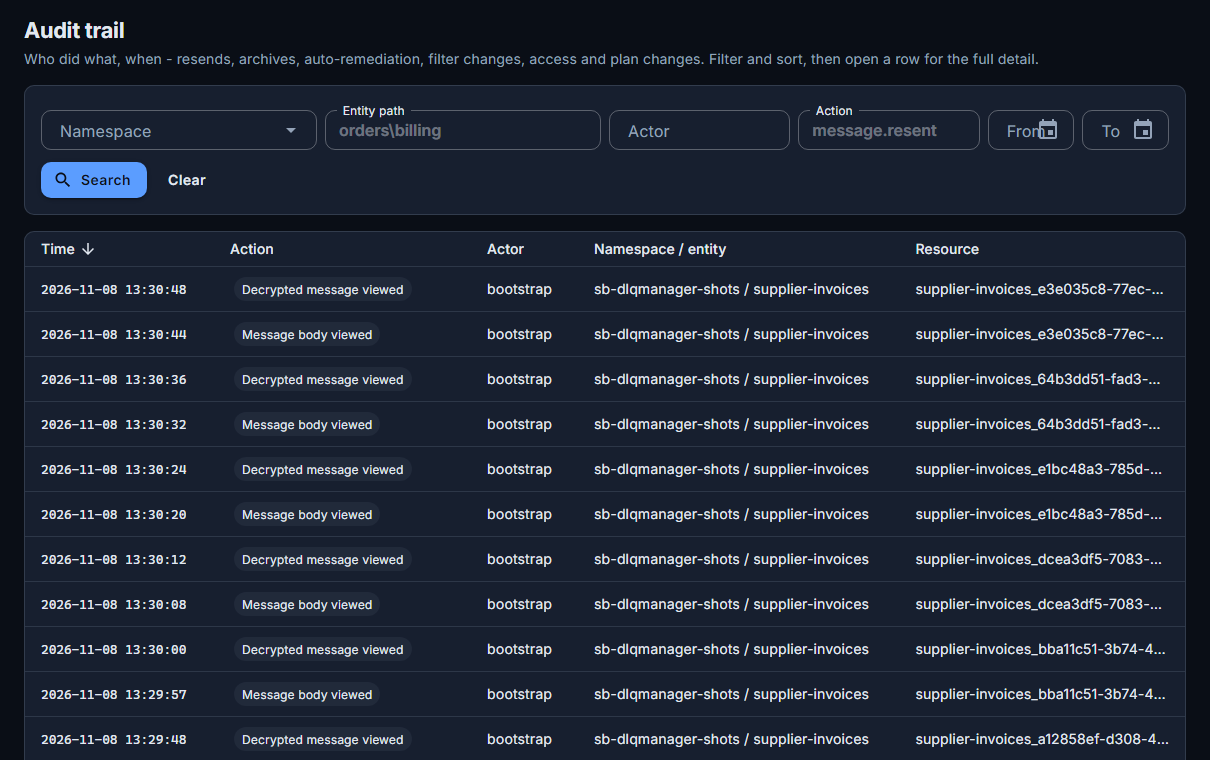
Every decrypted view is written to the audit log before anything is shown - who, which message, and the key's check value, never the key. Setting, replacing and removing keys, saving profiles and every test are recorded the same way.

The audit log filtered to decryption: entries for a key set, a profile tested and saved, and decrypted payload views, each with the person, the entity, the message and the key's check value
Step 7: the audit trail - every key change, every test and every decrypted view.

Around the flow

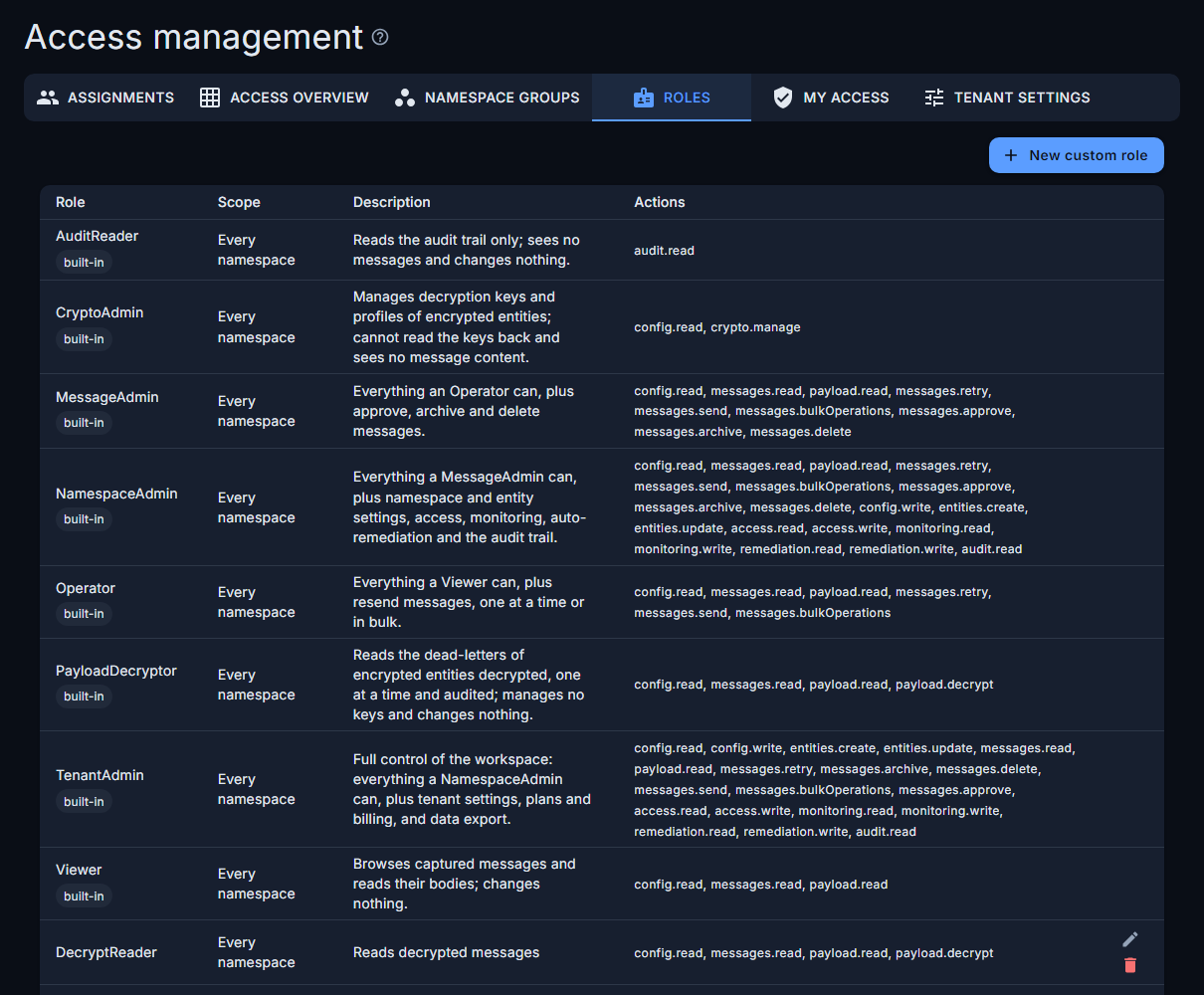
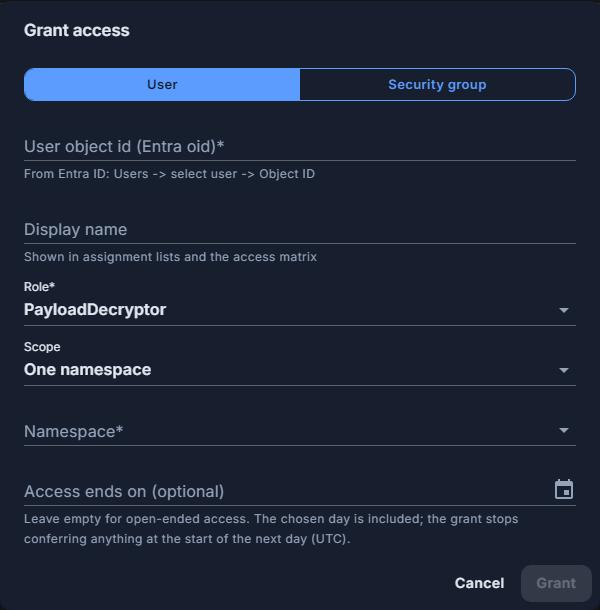
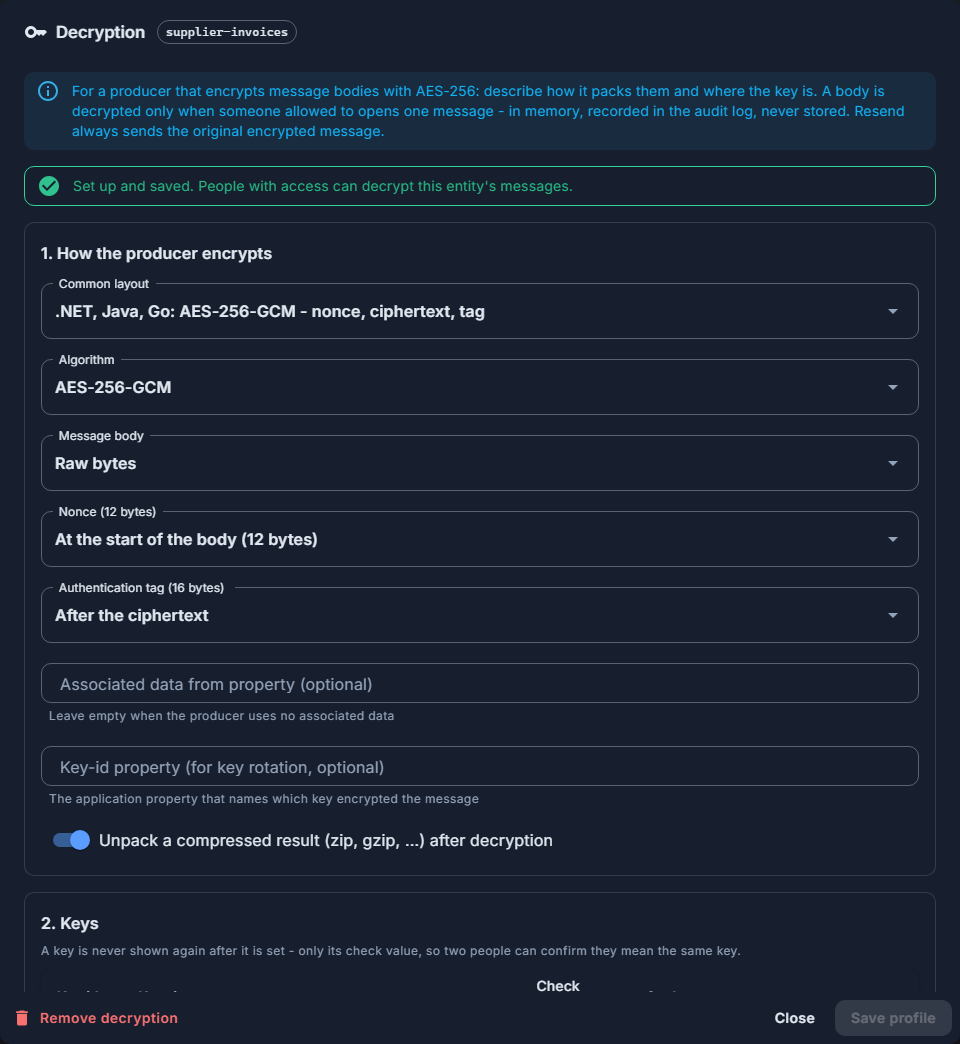
The roles, the grant, a configured entity, a second key while a producer rotates, and the encrypted message on the other tabs. Click a picture to see it full size.

The Roles tab of Access management: every built-in role with the chip 'built-in' on its own line under the name - AuditReader, CryptoAdmin, MessageAdmin, NamespaceAdmin, Operator, PayloadDecryptor, TenantAdmin, Viewer - with scope, description and actions, then a custom role with edit and delete buttons
Roles: CryptoAdmin and PayloadDecryptor are built in, beside your own roles.
The Grant access dialog: user or security group, the user's Entra object id and display name, the role PayloadDecryptor, the scope One namespace, the namespace, and an optional end date for the access
Grant: a decryption role for a user or a security group, for a namespace or one entity, with an optional end date.
The key dialog of a configured entity: the status line 'Set up and saved. People with access can decrypt this entity's messages.' above the layout
Saved: the status line says the entity is set up - and who can now decrypt.
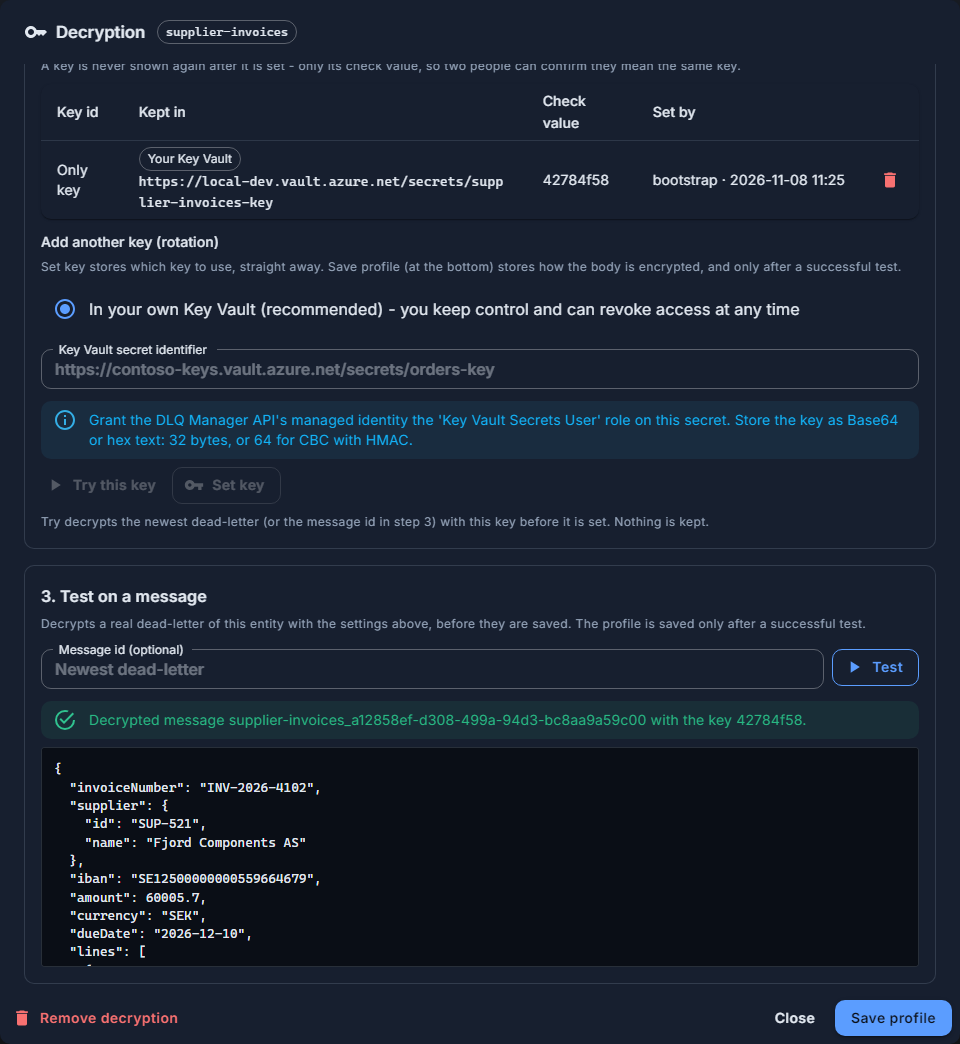
The Keys step of a configured entity: the key table with Only key, kept in your Key Vault with its secret identifier, check value 42784f58 and who set it; below it 'Add another key (rotation)' with a second identifier tried on a real message; the Test step shows when the profile was verified
Rotation: the key table with each key's identifier and check value, and Add another key - tried before it is set.
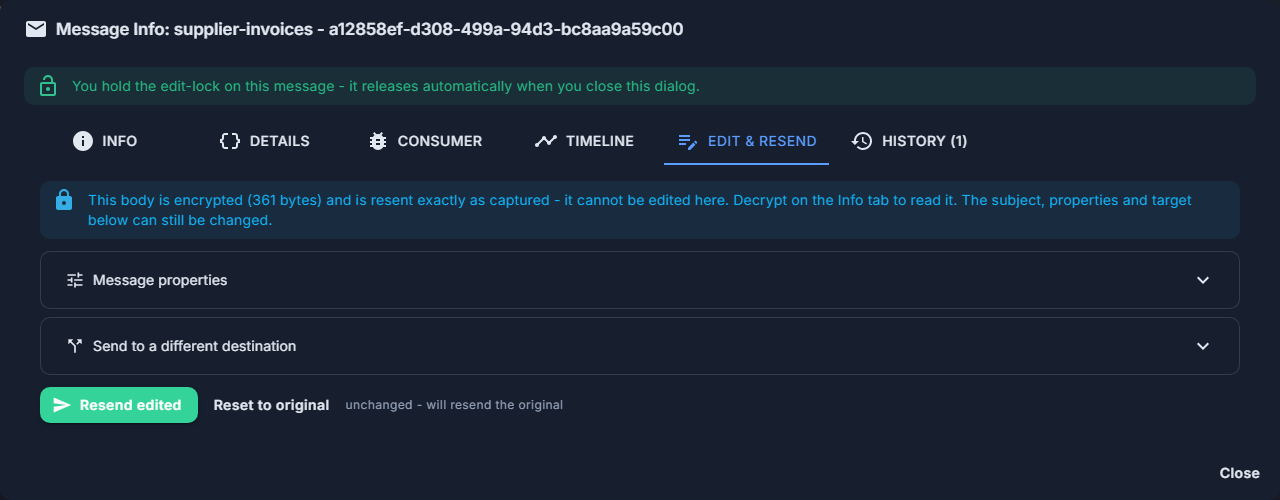
The Edit and Resend tab of an encrypted dead-letter: a banner saying the body is encrypted, 361 bytes, resent exactly as captured and cannot be edited here, decrypt on the Info tab to read it; the message properties and destination can still change
Edit & Resend: an encrypted body is resent exactly as captured - the envelope and destination can still change.
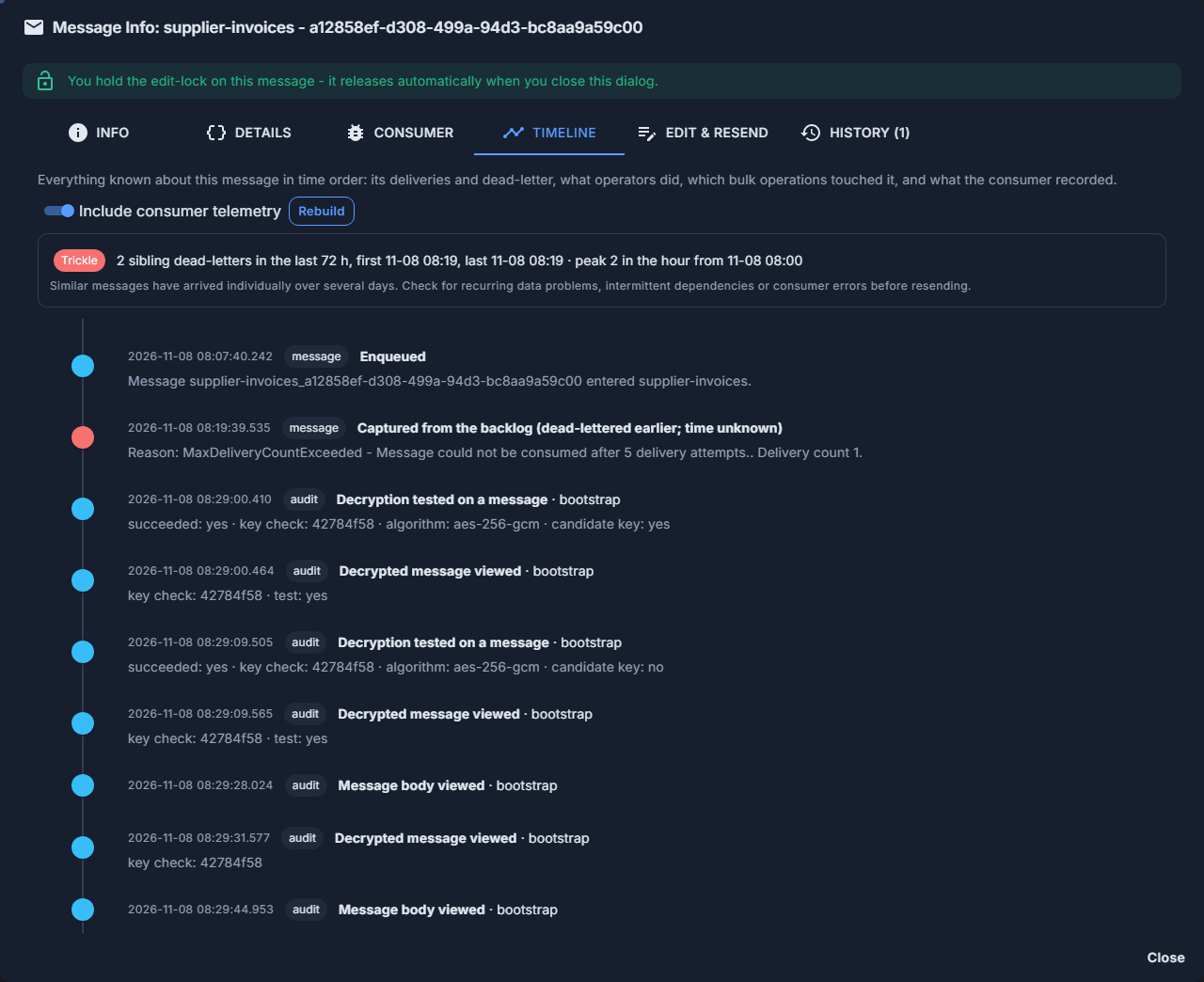
The Timeline tab of an encrypted dead-letter: enqueued, captured with its dead-letter reason, then 'Decryption tested on a message' with 'succeeded: yes · key check: 42784f58 · algorithm: aes-256-gcm', and each 'Decrypted message viewed' with its key check and who viewed it
Timeline: every test and every decrypted view of this message, with the key's check value.

Supported

AES-256 symmetric encryption, in the layouts producers use.

AlgorithmLayoutAuthenticated?Notes
AES-256-GCM nonce | ciphertext | tag, or nonce | tag | ciphertext; nonce from the body or a property Yes Recommended. Associated data from an application property
AES-256-CBC, PKCS7 IV | ciphertext; IV from the body or a property No Legacy - for a producer that cannot change; the dialog says so and why. New producers should use GCM or CBC + HMAC
AES-256-CBC + HMAC-SHA256 IV | ciphertext | MAC (encrypt-then-MAC) Yes HMAC length 32 or 16 bytes, its coverage and the 64-byte key order configurable

For every algorithm: the body as raw bytes or Base64 text, several keys per entity chosen by a key-id application property, and zip or gzip content unpacked after decryption.

Where the keys live - your choice, per key

Your own Azure Key Vault (recommended)

  • Paste the secret identifier; grant DLQ Manager's identity Key Vault Secrets User on that one secret.
  • You keep control and can revoke access at any time.
  • Your Key Vault logs every read.
  • OpsChisel never holds the key at rest.

Kept by OpsChisel

  • Stored in a dedicated customer-secrets vault, separate from the platform's own secrets.
  • Each secret is bound to your tenant and to that namespace connection.
  • Written once, never readable back through any API or page.
  • OpsChisel is then the custodian of that key: the service reads it to decrypt when an authorised person asks.
  • Simpler when you do not run a Key Vault of your own.

Security model

  • Keys are never shown again - only an 8-character check value, so two people can confirm the same key.
  • Two separate permissions: manage decryption keys, and view decrypted payloads. A Tenant administrator does not get them automatically; only a tenant-level administrator can hand them out - never to themselves (four eyes) - custom roles can carry them, and grants can be scoped to a namespace or a single queue or subscription.
  • Extra sign-in for setting keys and profiles - and for trying a key before it is set.
  • On request only: one message at a time, in memory, never stored, never indexed.
  • Every decrypted view is audited with the key's check value, before anything is shown.
  • One generic failure sentence, and repeated failures slowed to 20 per 10 minutes per person and 100 per entity - in the view, the test and the save alike.
  • Proven before saved: a profile must decrypt a real dead-letter of its entity - the API refuses a save without that proof while the entity has one; a Key Vault key can be tried before it is set.
  • Resend sends the original encrypted message, never plaintext.
  • Only your vaults. A key reference naming one of OpsChisel's own vaults is refused before any request is made.
  • Reviewed. The feature went through an independent deep technical review before it reached production; its findings and fixes are in the what's new stream.
  • Nothing changes for other messages: nothing is decrypted at capture, so messages that are not encrypted cost nothing extra.

Questions, answered

Can OpsChisel read my keys?

No page, API or export ever returns a key - to you, to an administrator, or to support. With your own Key Vault the key stays with you: you can revoke access at any time, and your vault logs every read. If OpsChisel keeps the key, it sits in a dedicated customer-secrets vault, bound to your tenant and namespace connection - and OpsChisel is then the custodian of that key: the service's own identity reads it to decrypt for you. If nobody but you may hold the key, keep it in your own Key Vault.

Can a tenant administrator decrypt?

Not by default, and not by their own hand. Managing keys and viewing decrypted payloads are left out of the Tenant administrator role. A tenant-level administrator has to grant them - to a person, a group or a custom role, scoped as narrowly as one queue - and can never grant them to themselves: a second administrator does, and the grant is audited.

What is resent?

The original encrypted message, exactly as it arrived - single or bulk. Plaintext is never sent anywhere; the consumer receives what the producer sent.

What if the key is rotated?

An entity can hold several keys. An application property on each message names the key that encrypted it, so old and new messages both decrypt while the producer rotates.

What does it cost for normal messages?

Nothing. Nothing is decrypted at capture; the work happens only when someone presses Decrypt on one message of a configured entity. The plain-JSON flow is unchanged.

Read the encrypted dead-letter without waking a developer.

Encrypted messages are part of the Enterprise plan - connect a namespace and set up your first decryption profile.