Products · DLQ Manager

Everything you need to operate dead-letters

One console for the whole DLQ lifecycle: capture, search, repair, resend, automate, alert and audit - across every namespace you run. Shipping continuously: see what's new.

Dead-letter capture & search - one pane of glass

OpsChisel continuously drains dead-letter queues from all connected namespaces into durable storage and indexes every message. Capture never drops a message to satisfy a quota, and every captured record keeps its lifecycle history for your plan's retention period (7 to 90 days): each delivery with the hash, length and encoding of the body it carried, and the body itself retained inline or in overflow storage - the record states per delivery whether that body is available, and the console opens it. Automatic capture covers queues and subscriptions without sessions.

  • Indexed search across message bodies (JSON strings, bounded per message), application properties and dead-letter reasons.
  • Filter by namespace, entity, error type, enqueue time or correlation id.
  • Live console - new dead-letters and counts appear in real time for every signed-in operator. No refresh button.
  • Every environment and team in a single, permission-aware view.
  • Saved views keep a team's recurring searches one click away - private or shared, with the sharing decision under the namespace admin's control.
  • The console speaks English, Swedish and Norwegian at full coverage, rendered and checked screen by screen.
  • Measured, not promised: in our documented Azure load test one burst captured 100,000 messages in 5.4 minutes - about 305 messages per second on average with a sustained peak of 450 - at a measured write cost of ~16 request units per message; more than 230,000 were captured across the session with no reported loss or database throttling, and namespace-stat requests measured 19.4 ms median and 124 ms p95 during the peak. Re-measured on 2026-10-12 after a week of rewrites (run 14): 105,000 messages in 4 minutes 8 seconds, a sustained peak of 590 per second, the same ~16.8 request units per message and zero loss; at that rate the write side reached the per-tenant storage ceiling and was throttled without a single failed write while the console stayed at 0.2-0.3 s per click. Historical results on those builds, not an SLA - see the full measured record.
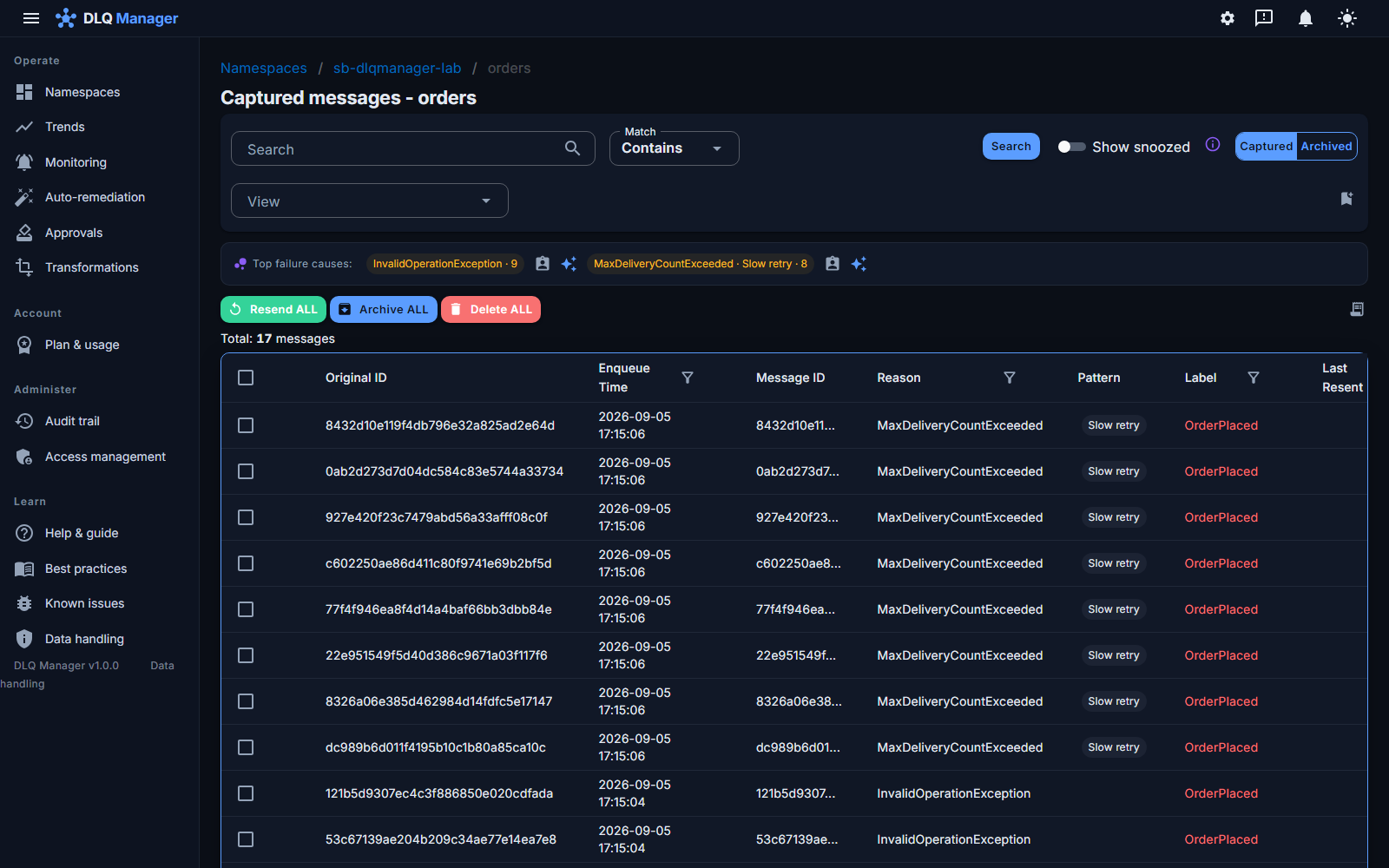
The captured-messages console for the orders queue: the top failure causes as chips, dead-letters in a searchable grid with match modes, per-column filters, reason, delivery pattern and label per row, and bulk resend, archive and delete actions
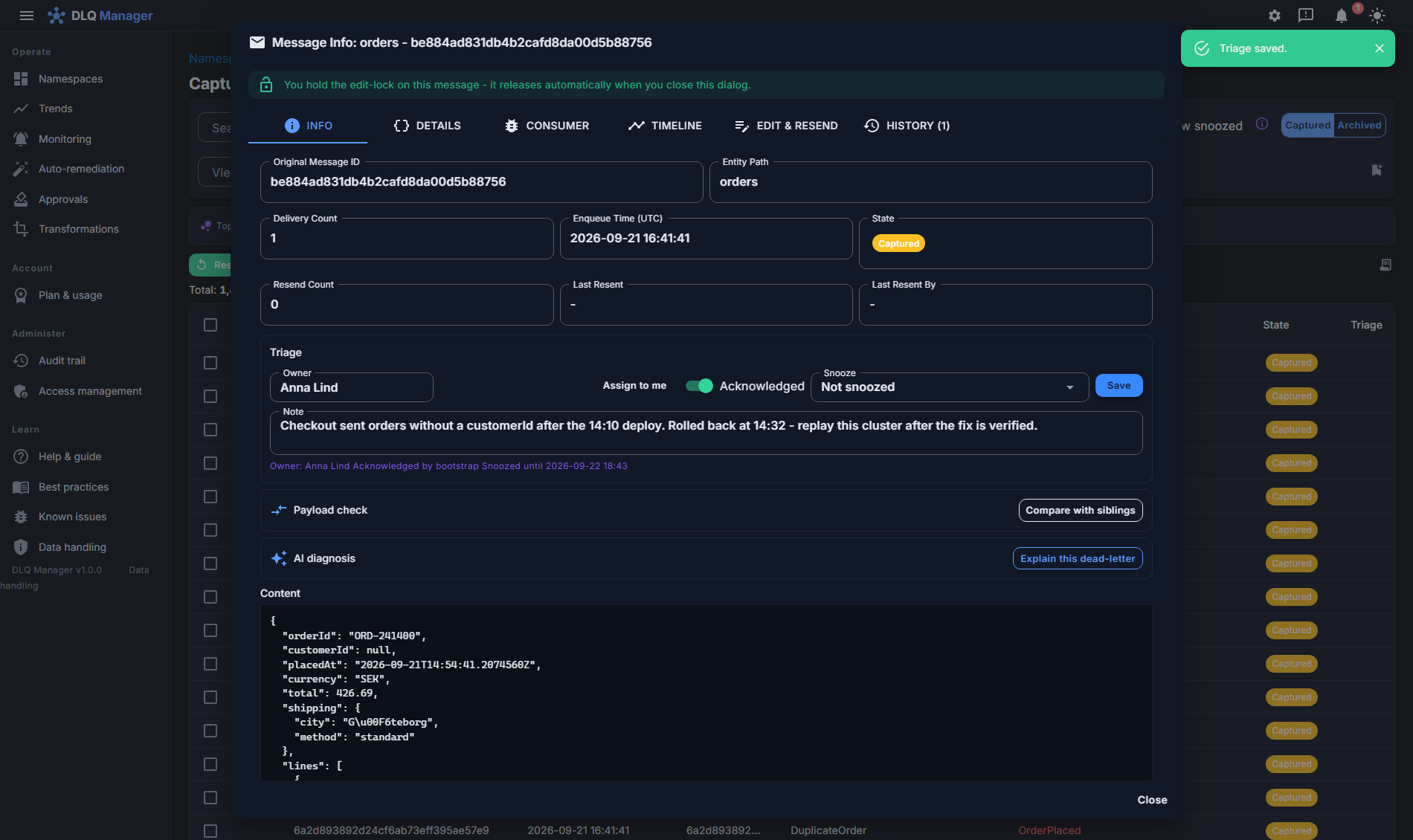
Triage on a message: owner Anna Lind, Acknowledged switched on, snoozed for 24 hours, a note about the 14:10 deploy, and the saved state 'Owner: Anna Lind, Acknowledged, Snoozed until' shown under the form, above the captured JSON order payload
Triage without losing anything: owner, acknowledged, snooze and a note on the message - snoozed messages leave the working view, never the sweeps.

Edit-and-resend: repair the payload, keep the evidence

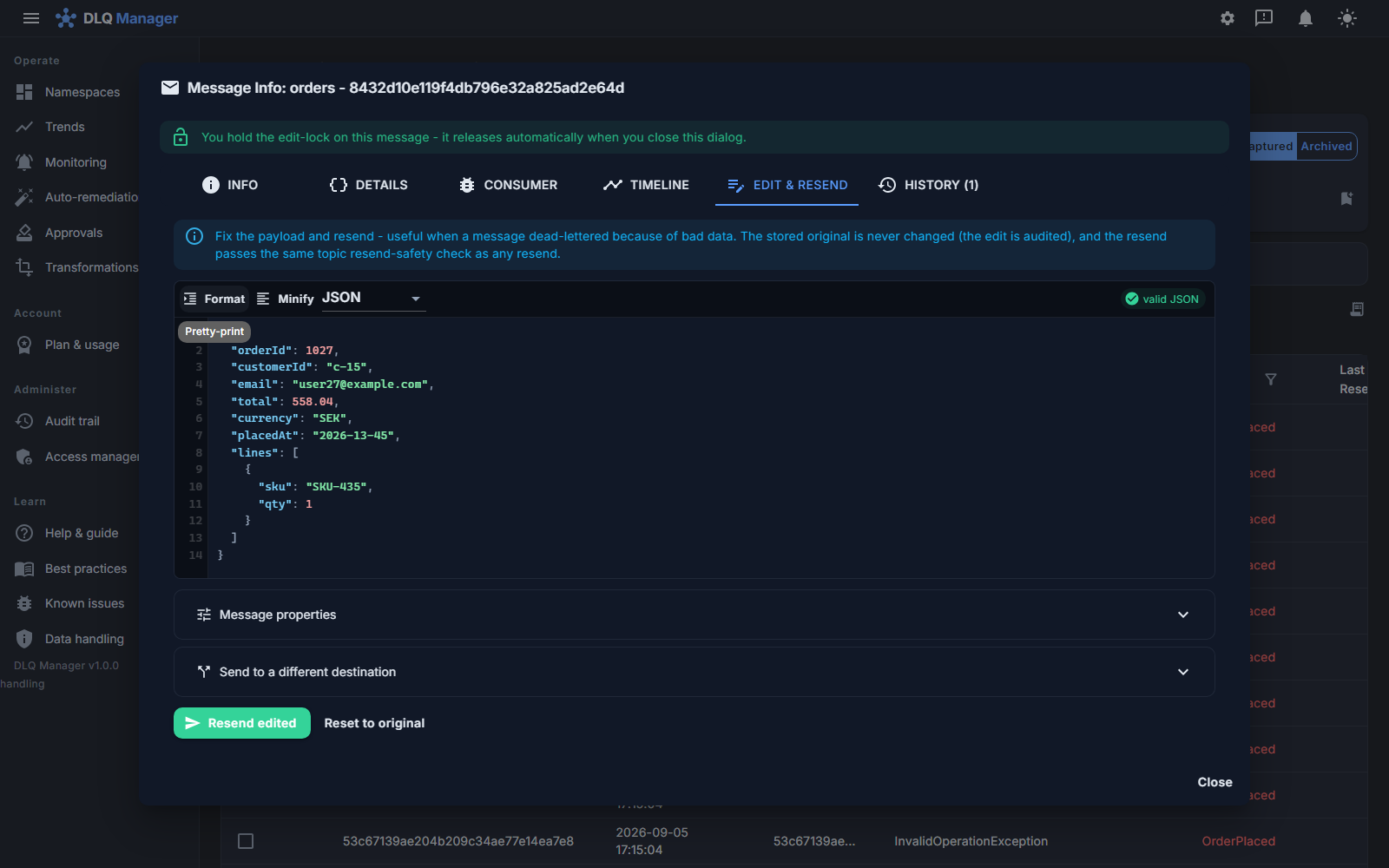
Fix the poison, not just the symptom. Open a dead-letter, correct the payload - JSON and XML are validated before send - adjust application properties, and resend to the original entity.

  • The stored original is never modified; edits become new, linked send operations.
  • JSON/XML well-formedness validation catches a malformed payload before it becomes a second failure.
  • Edit-locking - while you repair a message it's locked for other operators, live across the team; the lock releases the moment you leave.
  • Duplicate-safe by design - an already-resent message cannot be resent again, even from a window opened before the first resend: the server refuses with who and when, and send buttons grey out live in every session. Redirecting to a different destination stays a deliberate, allowed choice.
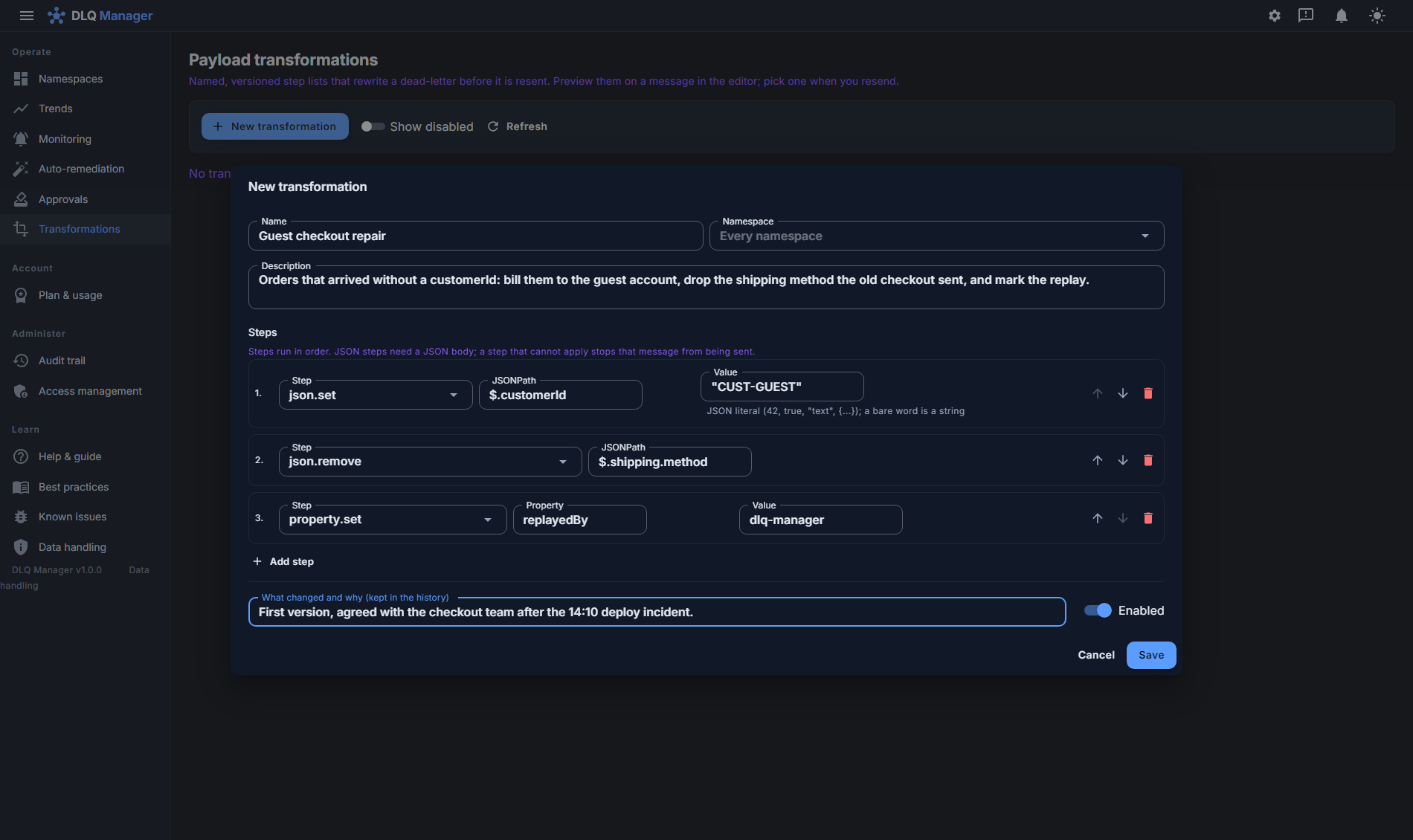
  • Versioned transformations - name a repair once (set, remove or rename JSON fields, replace text by pattern, adjust properties, label or content type), preview it against a real dead-letter, and apply it to one message or a whole replay. Every save is an immutable version and the resent message records exactly which one ran.
  • The product remembers the fix - a successful edit-and-resend is kept against its failure cluster (values redacted), and the next matching message offers it as a one-click starting point.
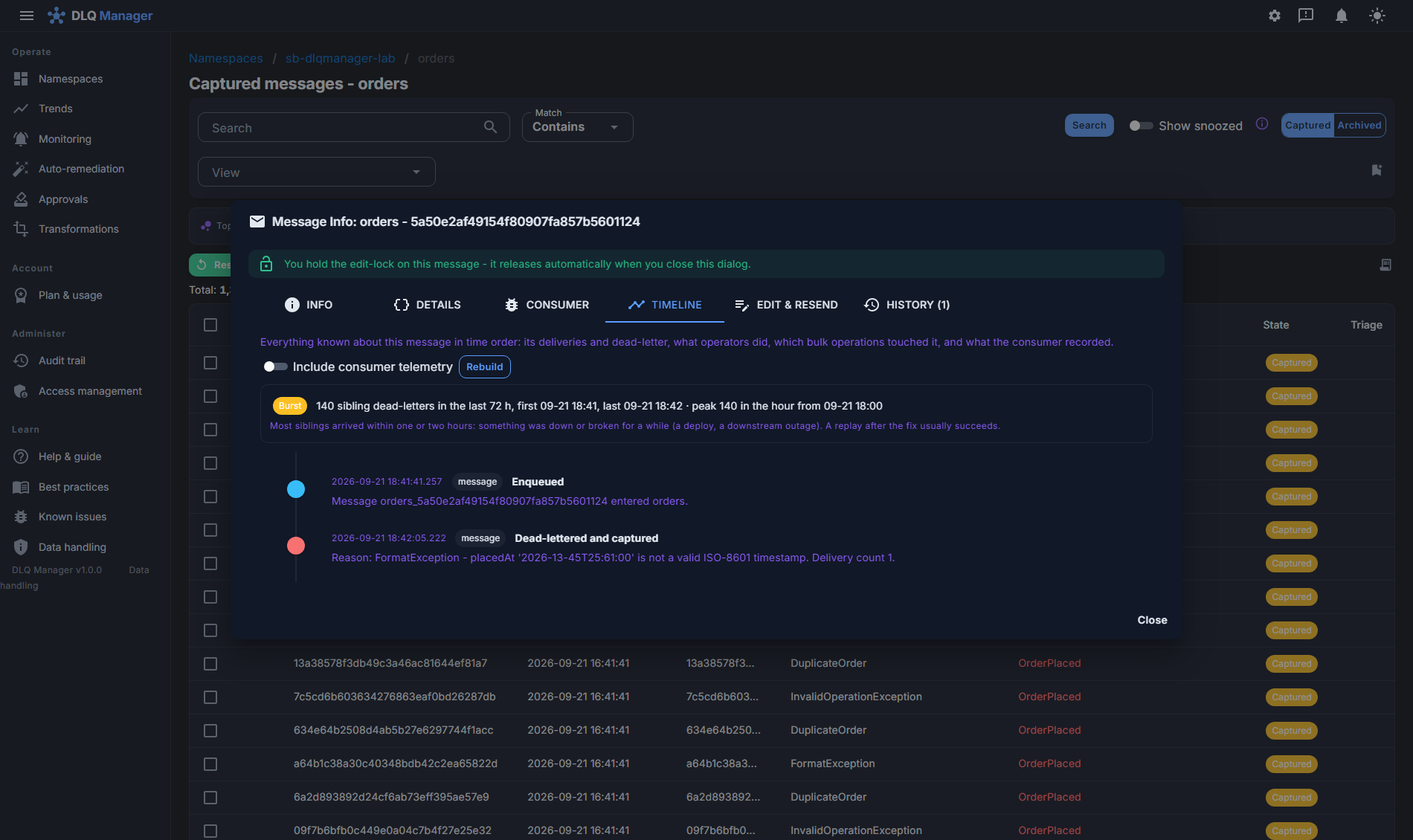
  • A timeline per message - enqueue, each delivery attempt and how it failed, the dead-letter, triage, edits, resends and every bulk operation that touched it, in order.
  • Edits and resends are recorded in the audit trail with who, what and when - the documented coverage says what is written synchronously, what by the change feed, and the failure window between a state write and its audit row.
The edit-and-resend dialog: a JSON payload editor with live validation, the team-wide edit-lock banner, message properties, redirect to a different destination, and the Resend edited button
The transformation editor: a named transformation 'Guest checkout repair' with three ordered steps - json.set $.customerId to CUST-GUEST, json.remove $.shipping.method, property.set replayedBy - a change note kept in the history, and an Enabled switch
A named, versioned transformation: ordered steps, a change note for the history, applied to one message or a whole replay.

Bulk operations & replay to a different entity

After an outage you rarely have one dead-letter - you have four thousand. Select by filter and bulk resend, archive or delete in a single audited operation, and watch the counts drop live as it runs.

  • Selection-aware safety: actions apply to exactly what you ticked - acting on everything requires a separate, spelled-out ALL confirmation.
  • Redirect / replay messages to a different queue or topic - ideal for reprocessing pipelines.
  • Archive keeps searchable copies out of the operational view without destroying them.
  • Deletes are explicit, permission-gated and audited under the same documented coverage.
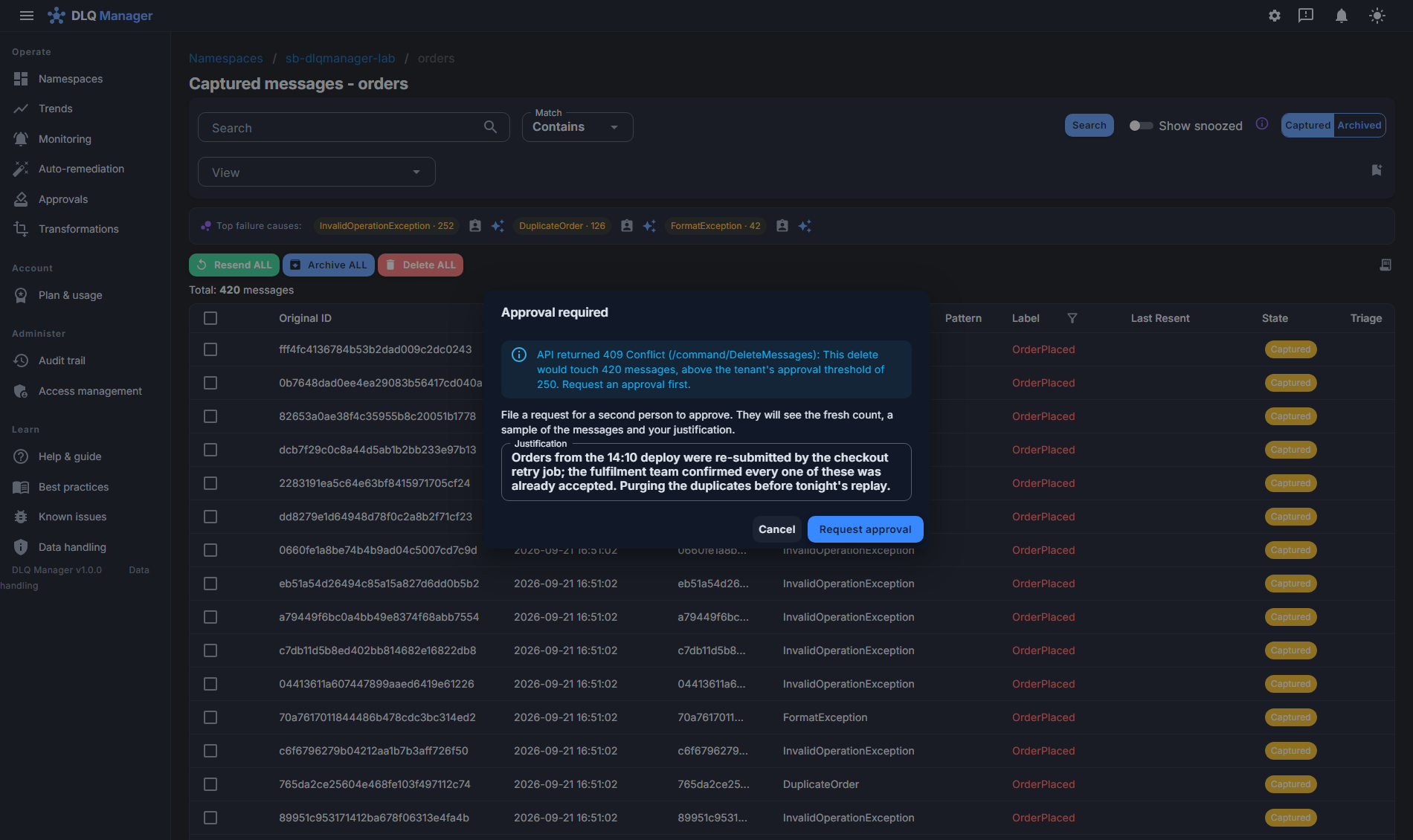
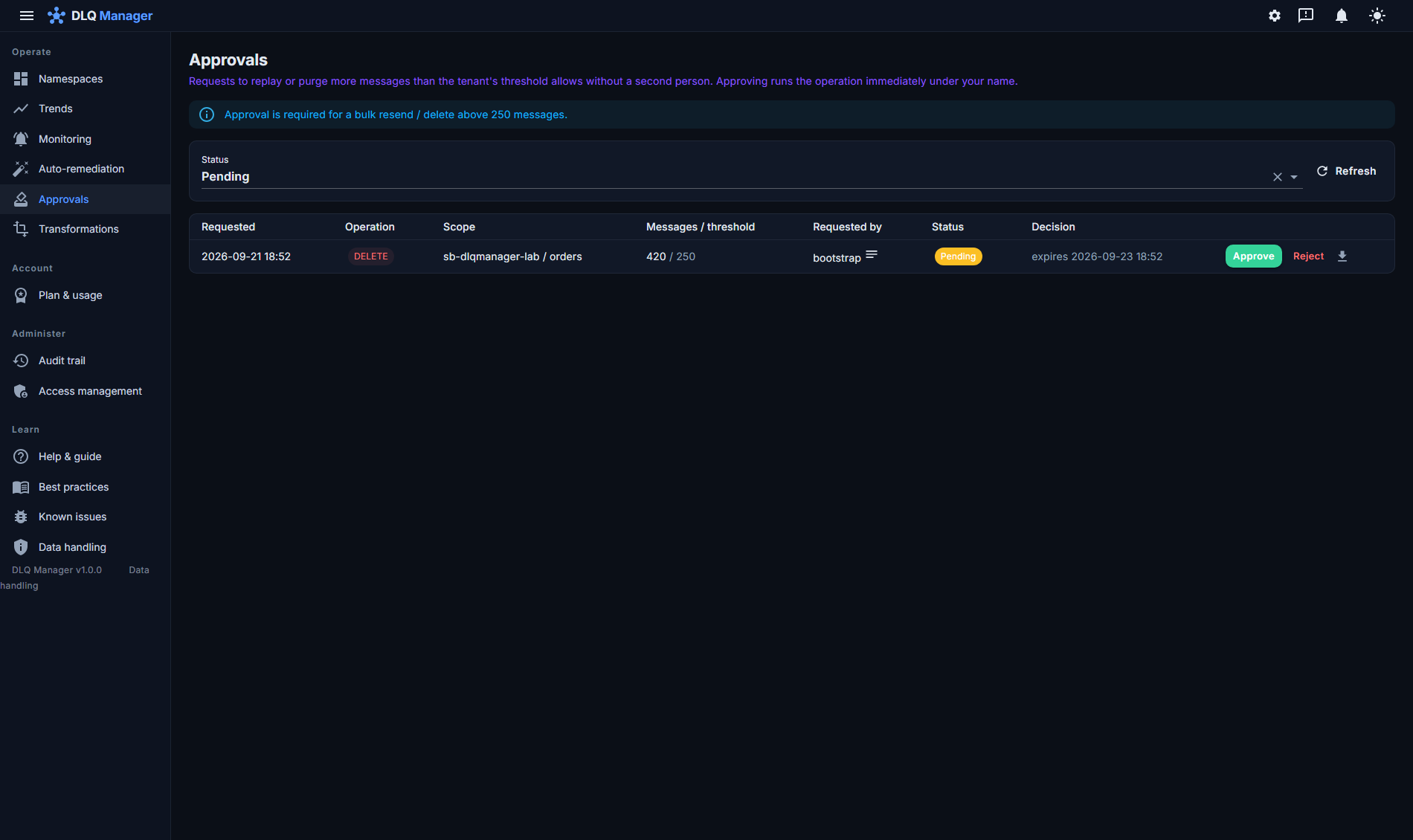
  • Four-eyes approval - above a threshold your tenant sets, a bulk resend, delete or vanished-entity cleanup waits for a second person with the right role. The count is of what will run - snoozed and archived messages included - and is taken again at execution against the same threshold; queues and subscriptions take the same route, and a department approver who holds the right on a namespace group sees that department's requests without a tenant-wide role. The request, the decision and an evidence pack are all kept, so a big replay is never one tired click.
  • Triage without losing anything - assign an owner, acknowledge, snooze until a date or leave a note on a message or a whole failure cluster (with an owner and a runbook link). Snoozed messages leave the working view but never the sweeps or the search.
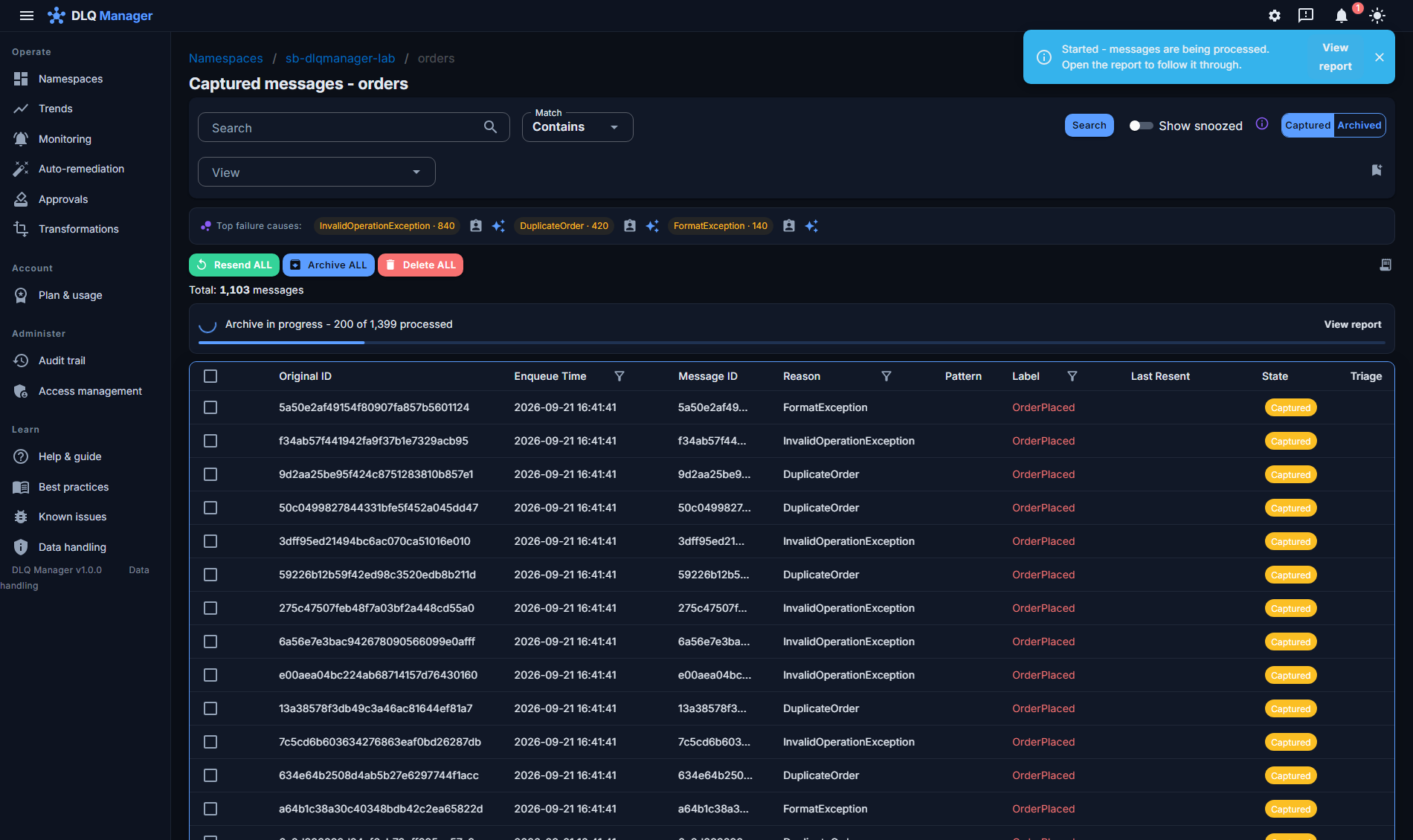
  • Live progress in every window - large sweeps count down in real time for every operator, survive page reloads, and can be safely restarted. Emptying a whole entity uses a server-side partition delete: 6,000 messages measured at ~30 request units of foreground cost.
  • Deleted-entity lifecycle: entities removed from Service Bus are flagged in the tree with a guided remove-everything cleanup - and their messages remain browsable, archivable and redirectable until you decide.
A whole-entity archive running on the orders queue: the live banner reads 'Archive in progress - 200 of 1,399 processed' with a View report link, the Started notification, and the Resend ALL, Archive ALL and Delete ALL actions above the grid
A whole-entity archive, followed live: processed so far of the expected total, with the per-message report one click away.
The Approval required dialog: a Delete ALL that would touch 420 messages, above the tenant's threshold of 250, becomes a request with a written justification for a second person to approve
Four-eyes: above the tenant's threshold a purge becomes a request - fresh count, sample and justification go to a second person.

Targeted resend safety for topics

Naïve tooling resends a topic dead-letter to the topic - and every subscription receives it again. OpsChisel resends so the message reaches only the subscription it dead-lettered in, never fanning out to siblings.

  • No duplicate side-effects in healthy subscriptions.
  • Safe by default - you don't have to remember the failure mode. The resend is refused until every subscription on the topic carries the targeting filter; the check is a tenant setting.
orders.events topic resend TargetSubscription = 'billing' redelivered not redelivered not redelivered billing where it dead-lettered analytics already processed it audit already processed it no duplicate side-effects in healthy subscriptions

Auto-remediation: rules that fix 2 a.m. failures at 2 a.m.

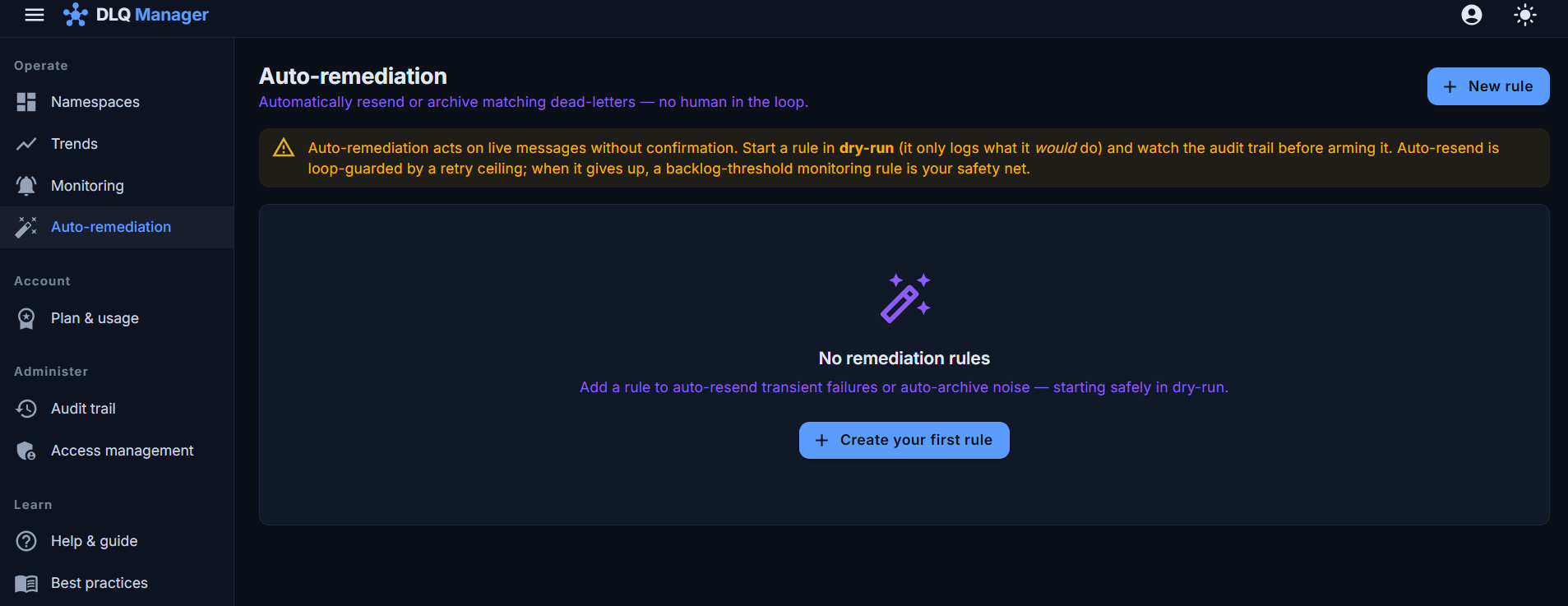
Turn recurring, well-understood failures into rules: when a dead-letter matches this filter, resend it (or archive it) automatically. Built to be trusted:

  • Dry-run by default - see exactly what a rule would have done before arming it.
  • Retry-ceiling loop guard - a message that keeps failing is parked for a human, never ping-ponged forever.
  • Never auto-deletes. Destructive actions always require a person.
The auto-remediation rules page: match filters on dead-letter reason, resend and archive actions with retry ceilings, and per-rule dry-run/armed state

Monitoring & alerts that carry the message, not just a metric

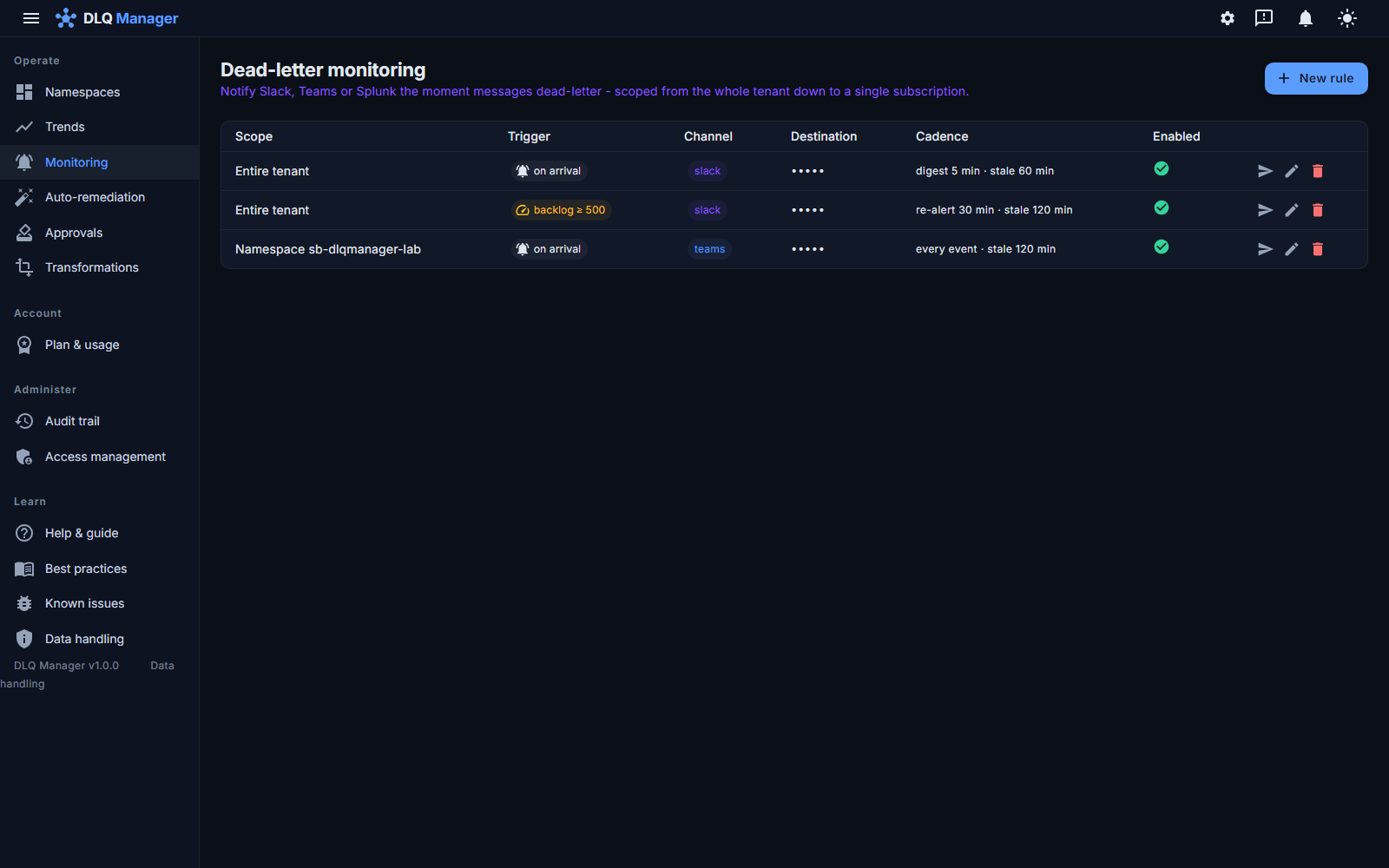
Get pinged in Slack, Microsoft Teams or Splunk - or by plain email and SMS for the on-call phone - the moment a dead-letter arrives or a backlog crosses a threshold, with the entity and dead-letter reason so triage starts in the channel.

  • Per-entity and per-namespace thresholds; drain storms fold into digests instead of a hundred pings.
  • One rule per department. A rule on a namespace group covers every namespace in it, now and later - the department's Teams channel gets every dead-letter from every one of its namespaces, and a namespace added tomorrow is covered without touching the rule.
  • Saved channels. Define "Membership Teams" once, owned by the department; every rule points at it, and rotating the webhook is one edit. Deleting a channel a rule still points at is refused.
  • Revocation has a stated bound. Rules, channel ownership and department membership are re-read at the start of every delivery pass (at most 50 deliveries, sequential, each bounded by its channel's timeout), so a route that stops being valid is dropped from the next pass on - a pass, not a number of seconds, is the promise.
  • Retried delivery - a flaky webhook doesn't lose you an alert.
  • Test-fire any channel to prove the wiring before you need it.
  • Signed webhooks, stable ids. Generic webhooks can carry an HMAC signature and every delivery has a stable id, so your incident pipeline verifies the sender and deduplicates retries - the receiver does both checks.
  • Maintenance windows defer alerts for the namespaces they cover until the window ends; nothing is dropped, and every failed or stale delivery is visible to operators.
  • Email & SMS are delivered through Azure Communication Services - no third-party relay.
The dead-letter monitoring page: rules scoped from the whole tenant, a namespace group or one namespace down to one entity, Slack and Teams channels, on-arrival and backlog-threshold triggers, digest cadences and per-rule test-fire

Failure-trend dashboards with per-entity drill-down

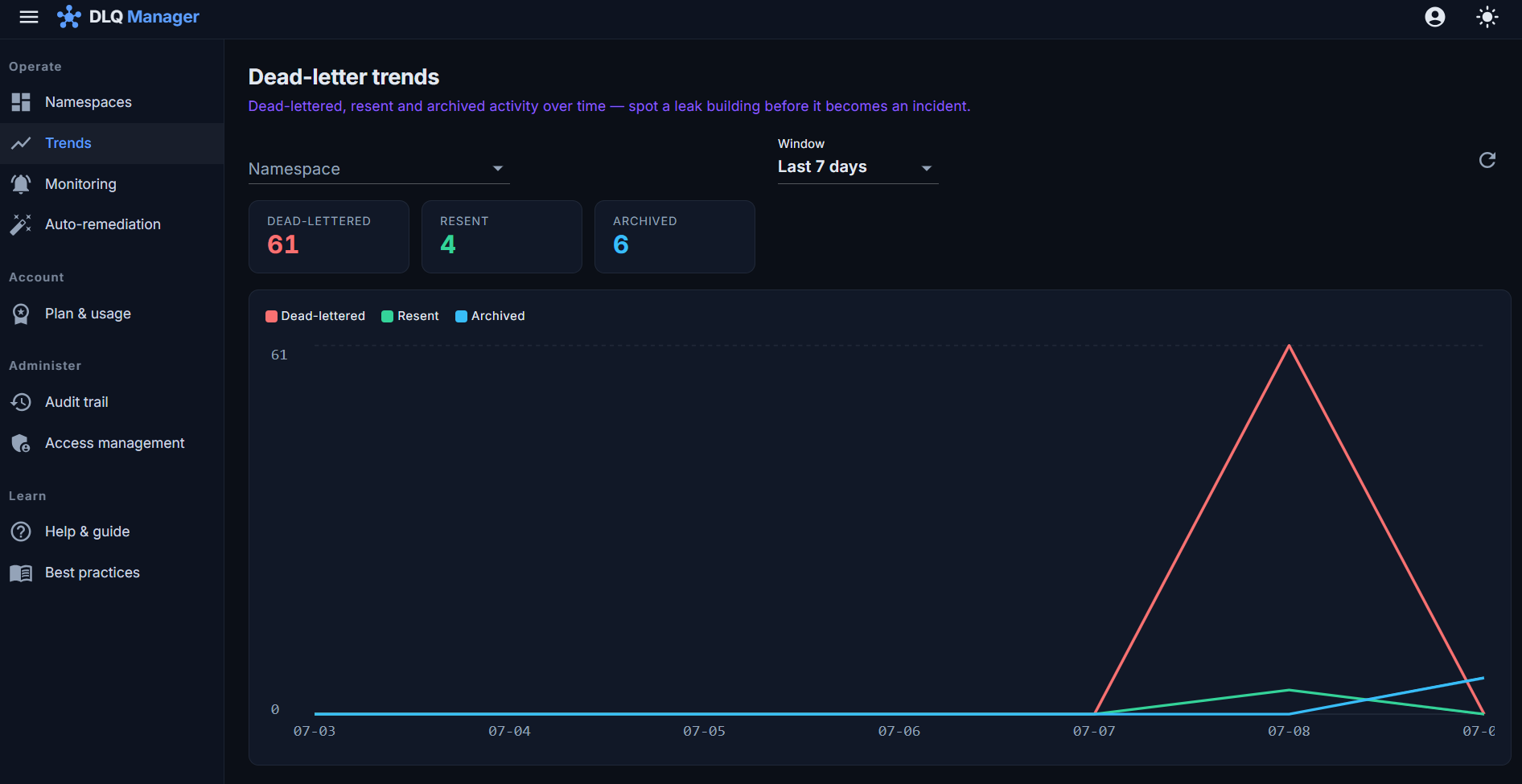
See failure rates over time across everything you run, spot the entity that started misbehaving after Tuesday's deploy, and drill from the trend line straight to the messages behind it.

  • Trends by namespace, entity and dead-letter reason.
  • Drill-down ends at the actual messages - not at a chart.
The failure-trend dashboard: dead-letter volume over time for a namespace with per-entity breakdown and window selection

Diagnose why it failed, not just that it failed

A dead-letter reason like "MaxDeliveryCountExceeded" tells you nothing you can act on. DLQ Manager works out the actual cause - first with checks that need no model, then, when you want it, with an assistant that reads the same evidence and explains the failure in plain language.

  • Compare with siblings: a deterministic diff against the shape the entity normally sees - a missing field, an unexpected null, a changed type or date format, an unknown enum, an empty or double-encoded body. No AI involved.
  • Delivery-pattern diagnosis: whether the consumer crashed, let a lock expire, abandoned quickly or retried slowly - inferred from the delivery count and timing (the broker reports counts, not each attempt), and used to split failure clusters apart.
  • AI "explain this dead-letter": opt-in and on-demand, never in the capture path, and everything above works without it. It runs through the deployment's configured OpenAI-compatible provider (Azure OpenAI, Azure AI Foundry, or a model you host in a self-hosted install), with an administrator-controlled data scope - metadata only, a redacted body, or the full body - and a usage limit per tenant. Redaction masks fields by name and values by pattern in parsed JSON and XML, and in a payload serialized inside a string field (three levels deep). A payload that looks structured but will not parse, an XML document with a DTD, or a payload nested deeper than that is not sent to the model at all - the diagnosis then works from the metadata and properties. It is a configured policy, not a guarantee that every sensitive value in free text is detected. Every call is audited.
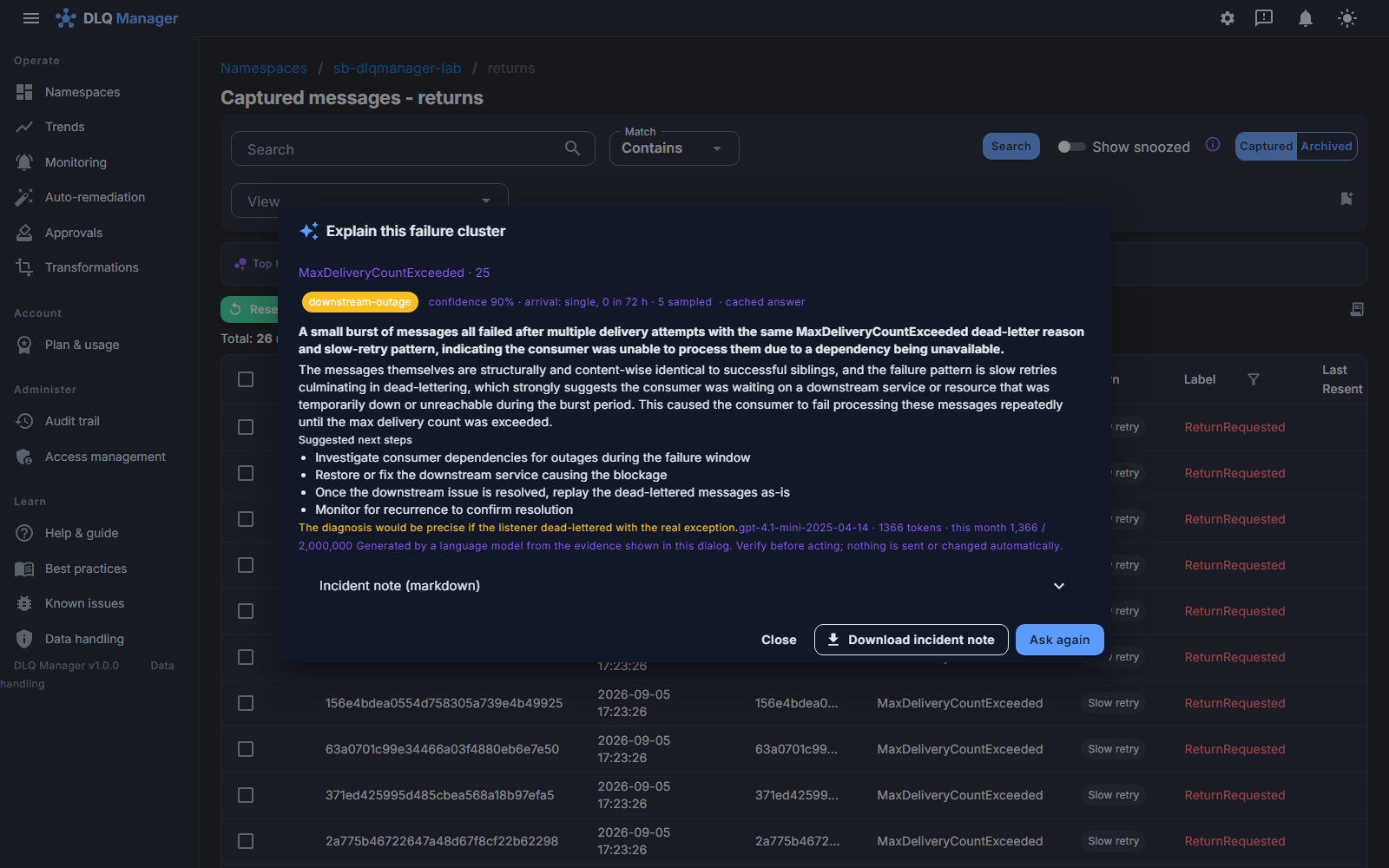
  • Explain a whole cluster at once and download a shareable incident note straight into the ticket.
The diagnosis dialog for a failure cluster on the returns queue: classified downstream-outage at 90% confidence, a plain-language summary and likely cause, four suggested next steps, the model and token count, and a downloadable incident note
The Timeline tab of a message: its failure cluster classified as a Burst of 140 sibling dead-letters in one hour, then the message's own events in order - enqueued, dead-lettered and captured with the FormatException reason and delivery count
The message's whole story in order, and the shape of its cluster: a burst says something was broken for a while - replay after the fix.

See the consumer's fault as your own telemetry recorded it

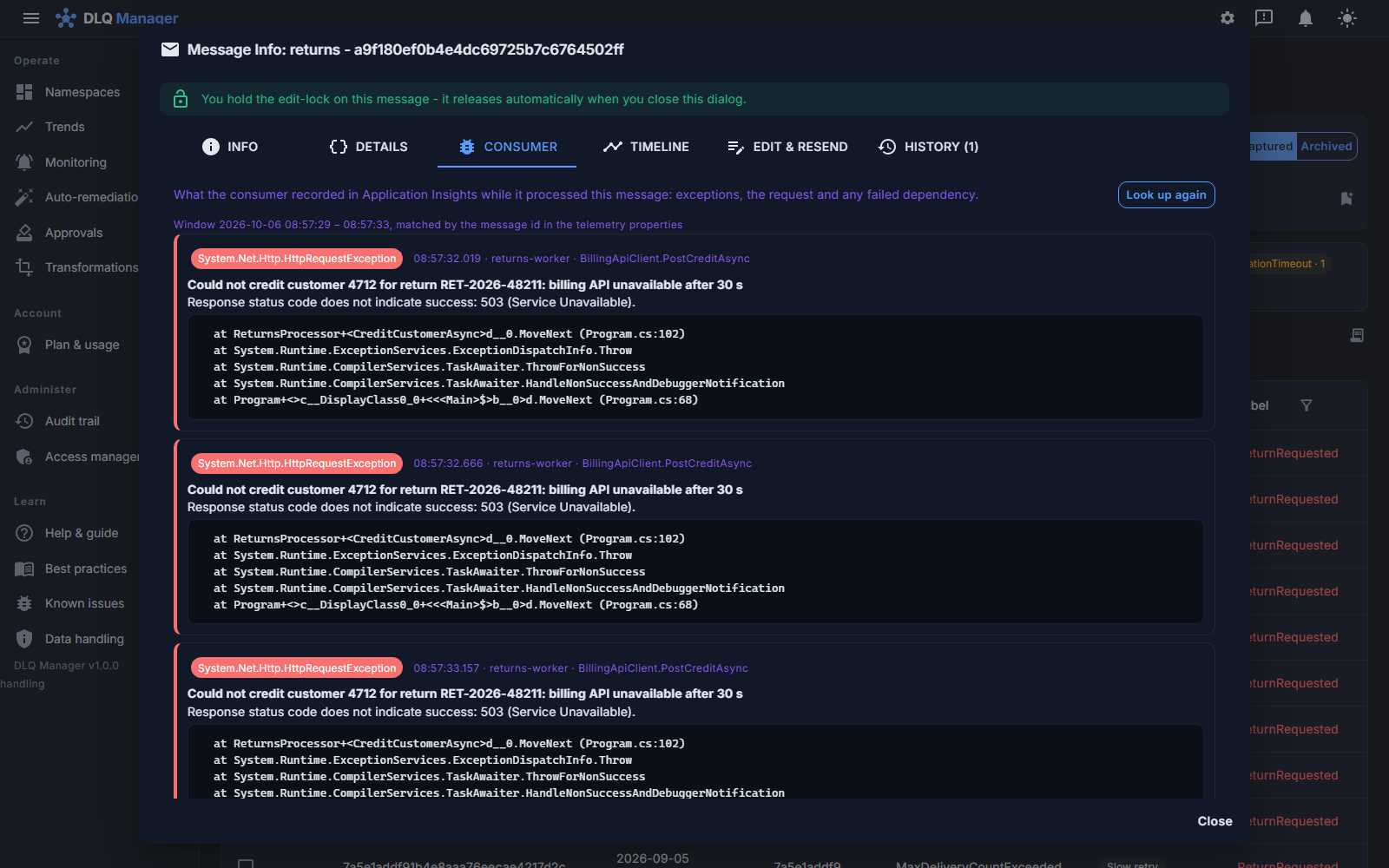
The dead-letter says a message failed; your application logs know why. Link a namespace to your Application Insights and DLQ Manager pulls the consumer's actual exception in next to the message - matched by trace id - so you stop guessing whether the payload or the code was at fault.

  • The exception type, message, top stack frames and the failed downstream dependency (say an HTTP 503 to an API) on a Consumer tab - and the assistant reasons from the same evidence.
  • Read-only, with a token issued in your own tenant: you grant the OpsChisel Connect app Log Analytics Reader on the workspace, so it can only ever read what you granted; a Test button proves access, and every read is audited.
  • Wherever an entity dead-letters because its consumer crashes or hangs, the product says so and points at the small code change - and a one-line client library - that dead-letters a poison message cleanly instead of retrying it forever. See best practices.
The Consumer tab of a dead-letter: three exceptions the returns-worker recorded in Application Insights for the message's three deliveries - 'Could not credit customer 4712: billing API unavailable after 30 s', the 503 beneath it, and the stack frames - matched by the message id

Fine-grained RBAC and an audit trail with stated coverage

Operations tooling touches production data, so access control is not an afterthought. Built-in roles cover the common cases; custom roles let you shape exactly who may view, resend, edit, archive or administer.

  • A read-only viewer role for support and audit teams.
  • Grant roles to Entra security groups as well as users, and confine a custom role to one namespace so a team owns its own access without reaching anyone else's.
  • Namespace groups give each department its own slice of the estate - see access by department below.
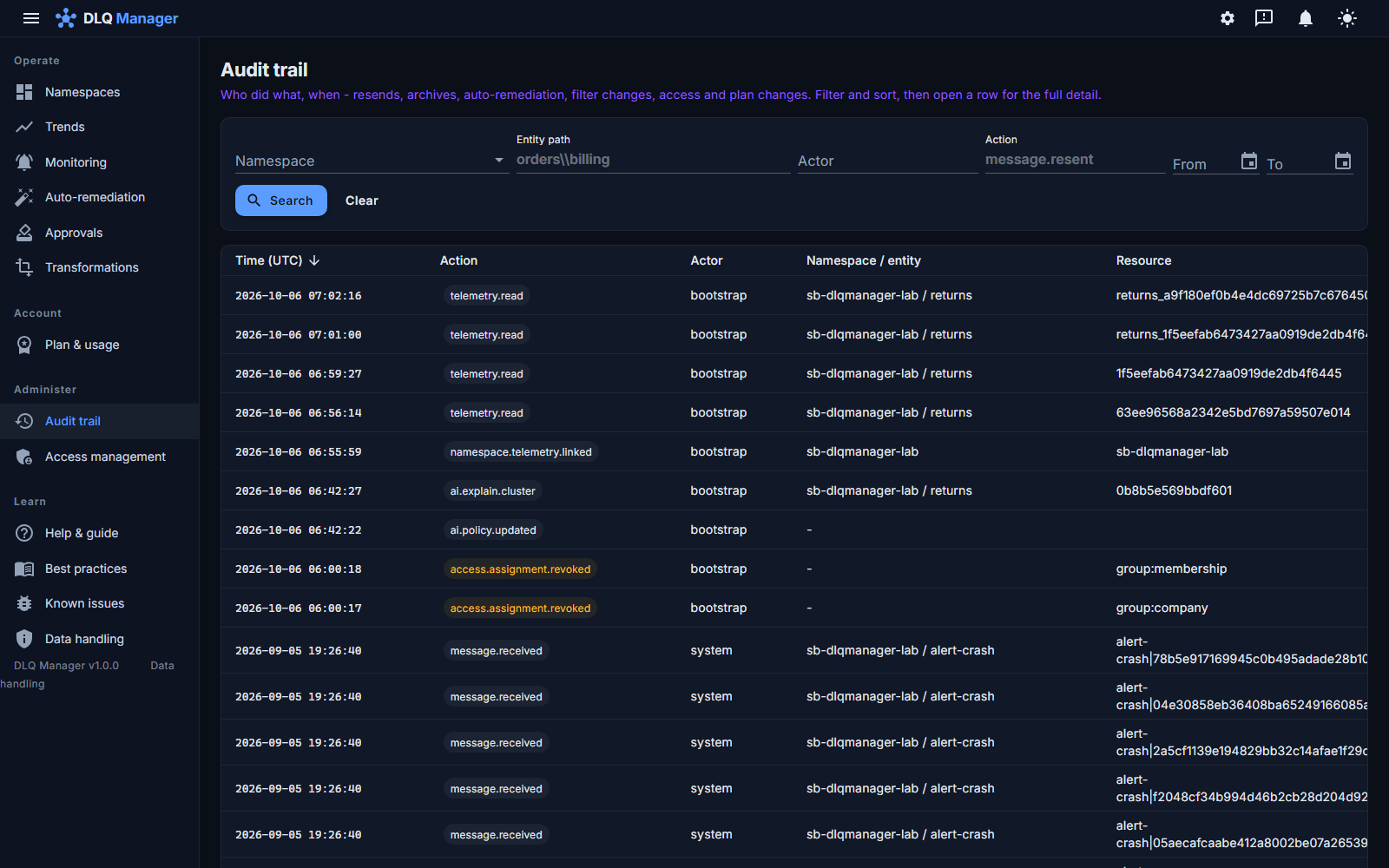
  • Message operations and access, rule and channel changes are written to an append-only audit trail with the actor; AI and telemetry lookups too. The documented coverage lists what is recorded by the handler, what by the change feed, and the failure window between a state write and its audit row.
  • Operational visibility without payload access - payload.read is its own permission, so a custom role can let a support team see entities, counts, reasons and history without ever opening a body.
  • Compliance-ready: answer "who resent what, when, and what did they change?" in seconds.
  • Your data leaves when you do - export retained records, every referenced payload (the current body and every retained prior body, inlined under its hash) and archived audit files as line-delimited JSON with a file manifest and integrity hashes; a reference the store could not serve is counted and listed, historical or current. A verified purge removes a tenant's data from every live container and blob and re-counts to zero before it reports done (backup, version-history and log retention are documented separately). See the security and data-handling page.
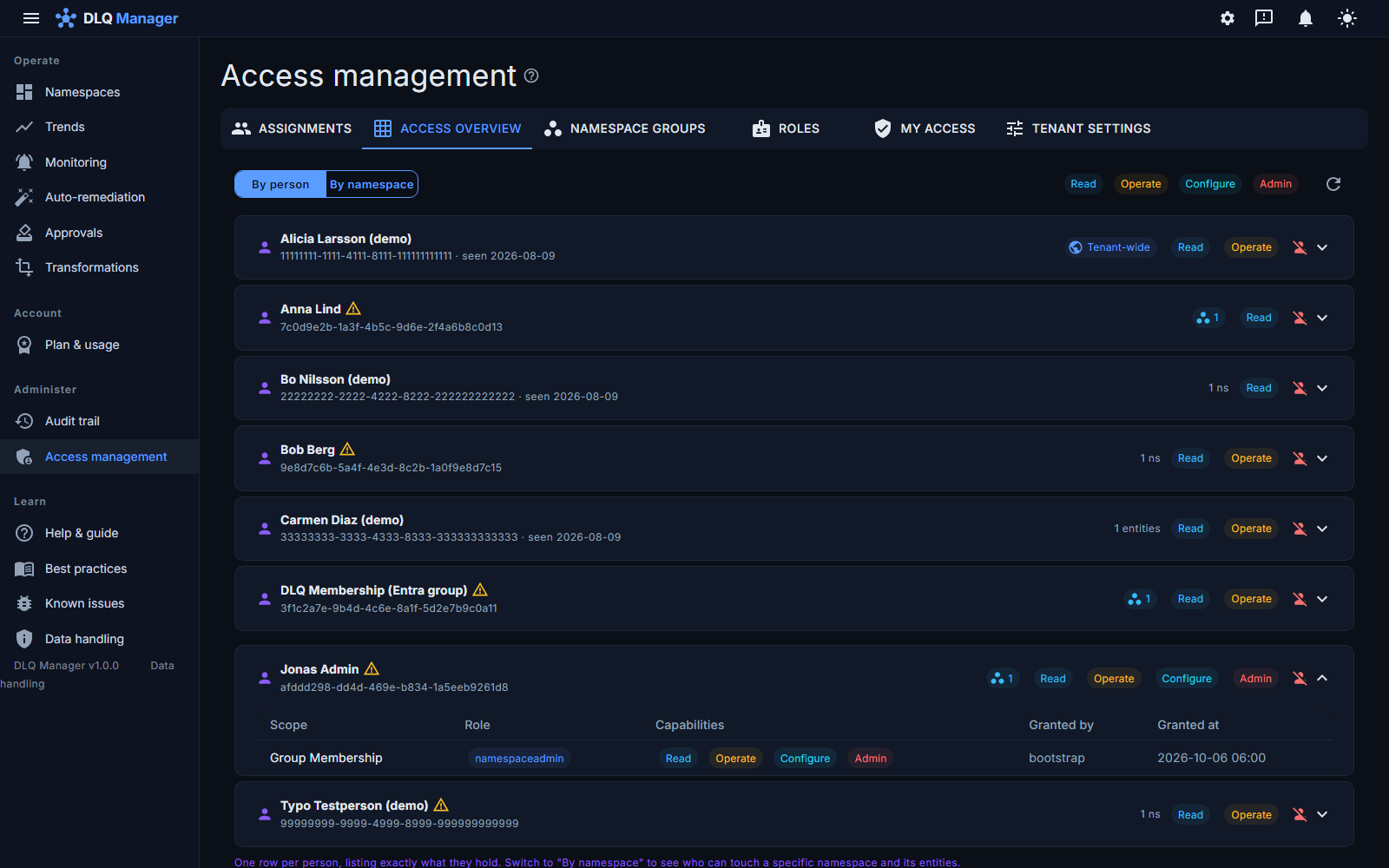
Access overview by person: one row per person with their capabilities, a group chip for grants that come through a namespace group, and Jonas Admin expanded to show Namespace Admin on the Membership group
The audit trail: timestamped, filterable entries - telemetry lookups, an AI diagnosis, access revocations, captured messages - each with actor, namespace, entity and resource id
The Approvals page: one pending request to delete 420 messages against a threshold of 250 on sb-dlqmanager-lab / orders, who requested it, when it expires, and Approve, Reject and evidence-pack download actions
Approvals: who asked for what, the fresh count against the threshold, and an evidence pack to download - every decision audited.

Access by department, without a list of grants

A large estate is not one team. Membership runs fifteen namespaces, Company runs twelve, and the people who move between them should take exactly the right access with them. DLQ Manager models that the way Teams, Slack and Azure itself do: a namespace group is the department's set of namespaces, the department's people stay in an Entra security group, and one role binds the two.

  • One grant per department. A role on the group covers every namespace in it - the ones it holds today and the ones added tomorrow. Onboarding a namespace into a department is a tick in a list, not a round of grants.
  • Joiners, movers and leavers happen in Entra. Grant the department's security group (dynamic on the department attribute if you like) and a person who changes department gets the new access and loses the old one at their next sign-in. Nobody opens DLQ Manager.
  • Department admins who stay in their lane. Namespace Admin on a group makes a department admin: they grant and revoke on the group and manage monitoring and rules for its namespaces, see only their own side of any shared namespace, and cannot see or act on another department's namespaces. Which namespaces a group holds stays with a tenant admin.
  • One rule to keep. The department's people are an Entra security group assigned to the app with the "Member" role; a product app role (Viewer, Operator, ...) is tenant-wide and would bypass the groups. A grant applies immediately where it was made and within 60 seconds everywhere; removing someone from the Entra group takes effect at their next sign-in.
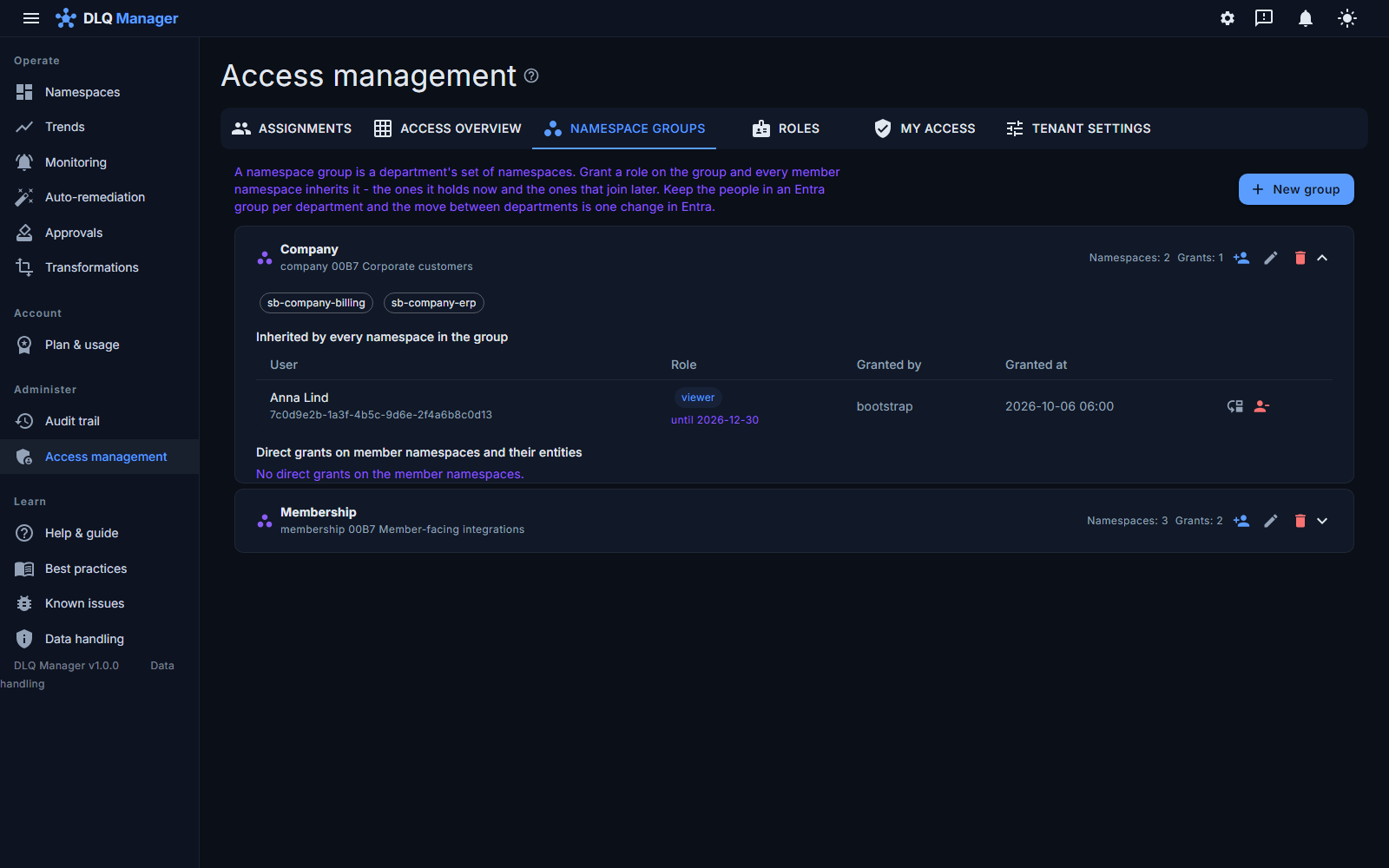
  • One screen per department. The group's namespaces, every role inherited through the group, and the direct exceptions on single namespaces - who, which role, since when, granted by whom.
  • The department's own alert channel. A saved channel owned by the group ("Membership Teams") and one rule on the group: every dead-letter, stalled consumer or new failure pattern from any of the department's namespaces lands in the department's channel. The department admin sets both up; the SOC's tenant-wide rule keeps firing alongside - a department rule adds a recipient, never silences one. Deleting a department removes its grants, its rules and its channels, with the counts on record.
  • Moves, time limits and offboarding as single actions. Move a person's grants to another group in one step (the new access is created before the old is removed, and a move that failed halfway is finished by retrying it), give a contractor access until a date, or remove a person's direct product grants in one action - inherited Entra group access and tenant-wide app roles are managed in Entra - all written to the audit trail with the role and scope that changed.
The Namespace groups tab: the Company group expanded, showing its two namespaces, the role inherited by every namespace in the group (Anna Lind, viewer, until 2026-12-30) with move and revoke actions, and the Membership group below
One screen per department: its namespaces, the roles every one of them inherits, and the exceptions.
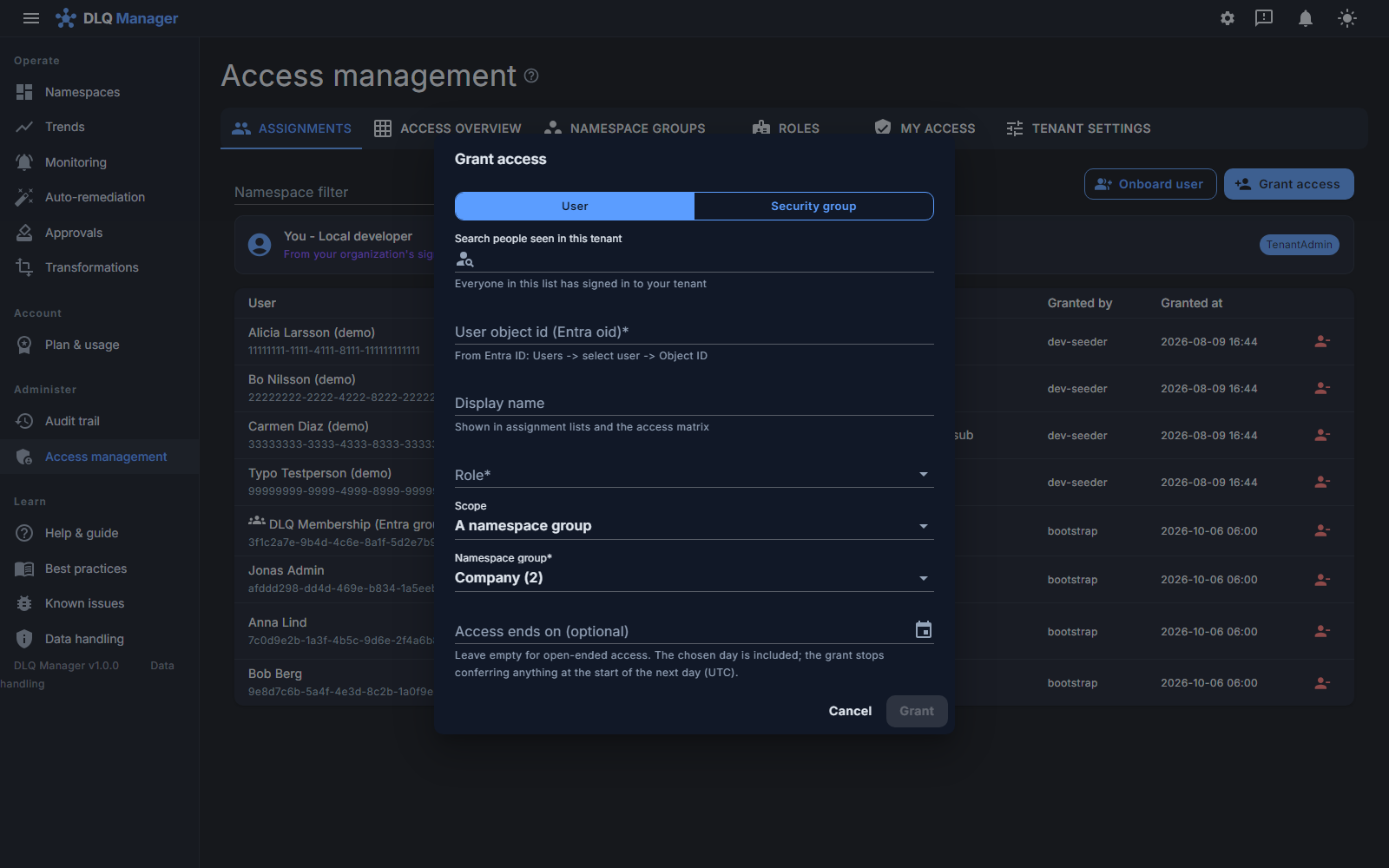
The Grant access dialog with scope set to A namespace group, the Company group picked, and an optional day on which the access ends
Grant on the department, not on fifteen namespaces - and set a day the access ends when it should.

Getting in: one click, no ticket, no deployment

Sign in with the Microsoft work account you already have. That single sign-in is the request: your organization is registered from your Entra tenant and, once we approve it (during our initial rollout every new organization is approved by a person), its workspace is created and the first eligible user from your organization becomes its administrator - no app roles to assign in Entra first, no waiting for us to edit a configuration. Everything here is what the product shows, step by step.

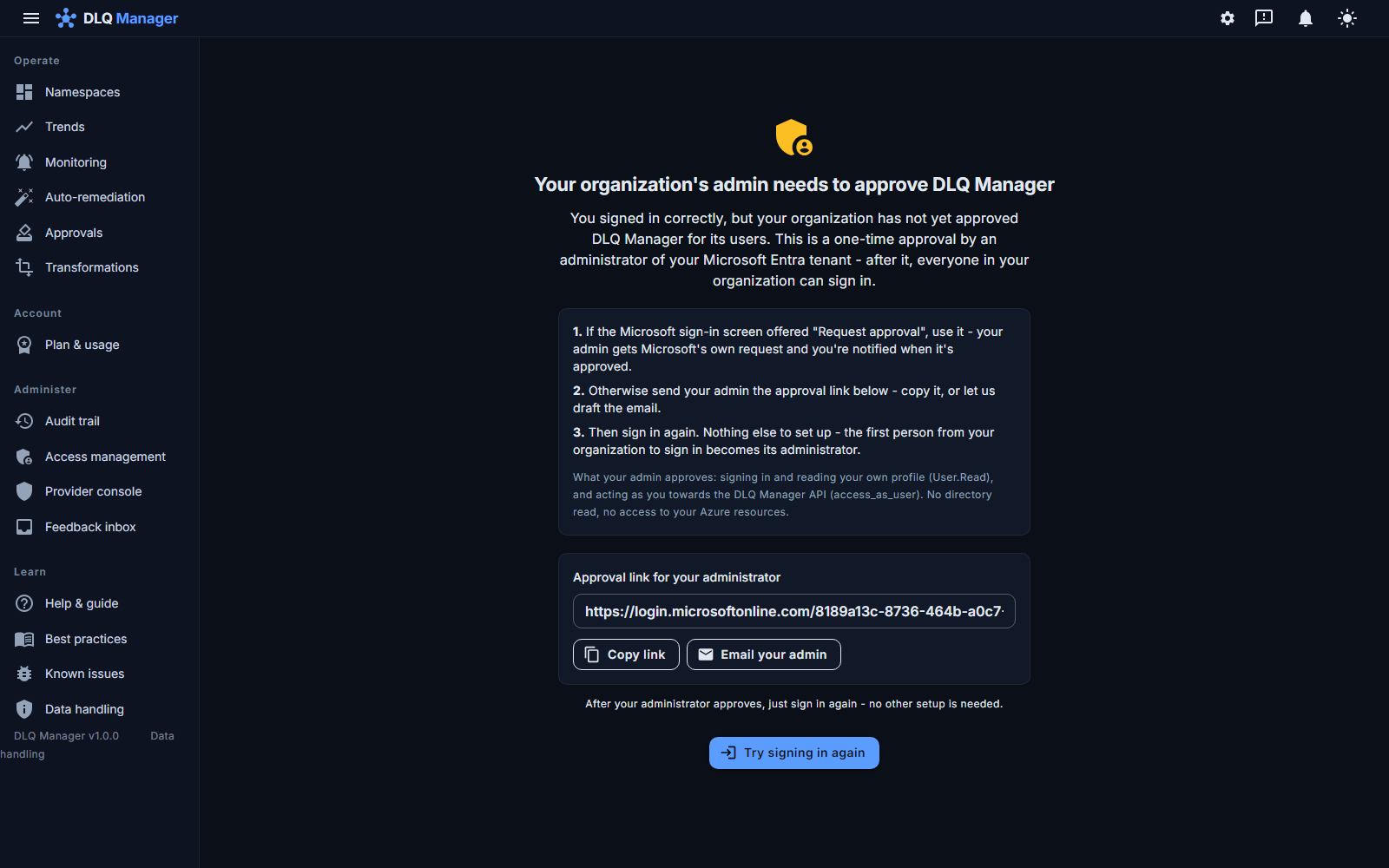
  • Your organization's policy requires an admin approval? The page says exactly what to do - Microsoft's own Request approval if your tenant offers it, otherwise a ready-made link to copy or mail - and exactly what the admin is approving: sign-in, your own profile, and acting as you towards the DLQ Manager API. No directory read, no access to your Azure resources.
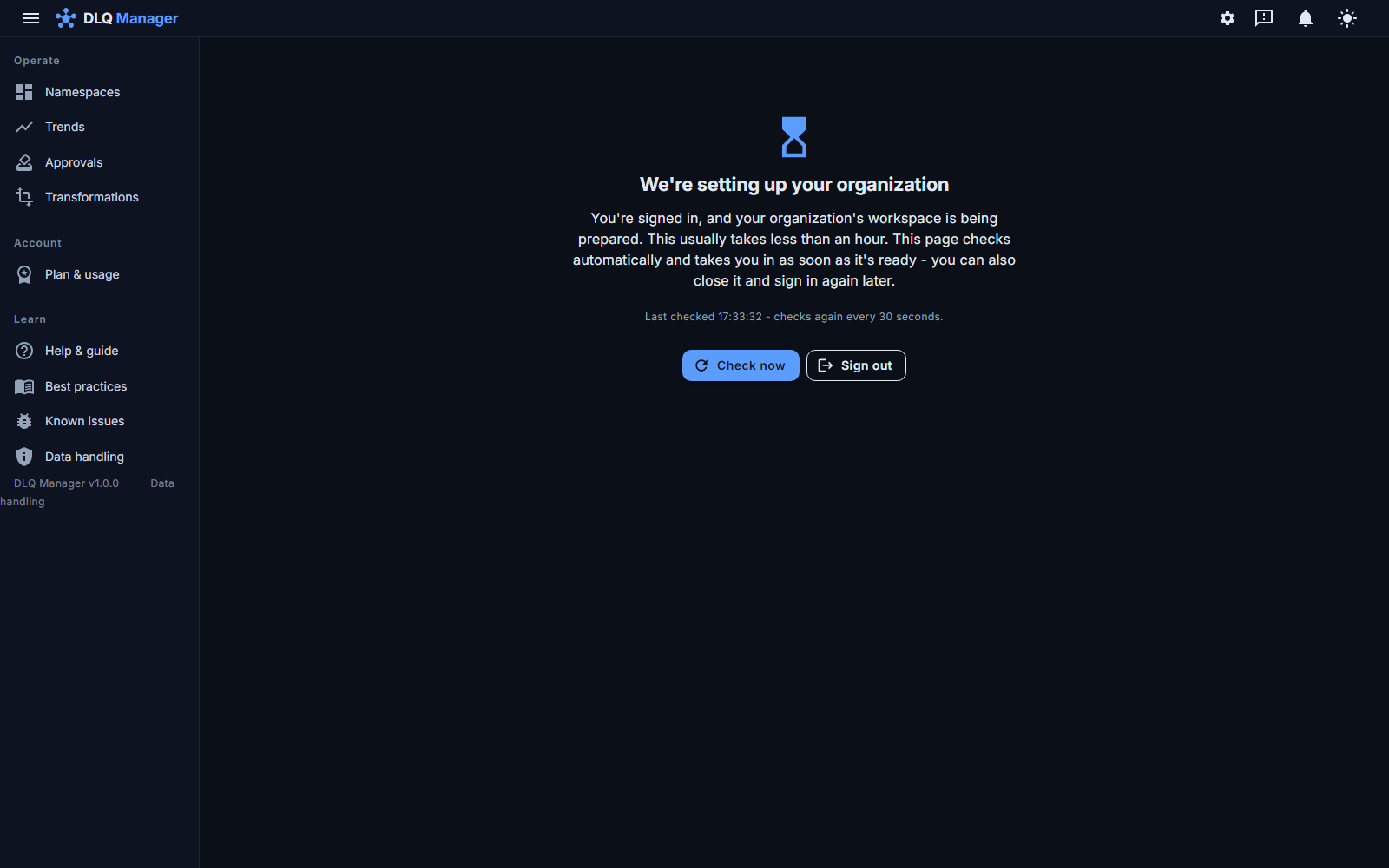
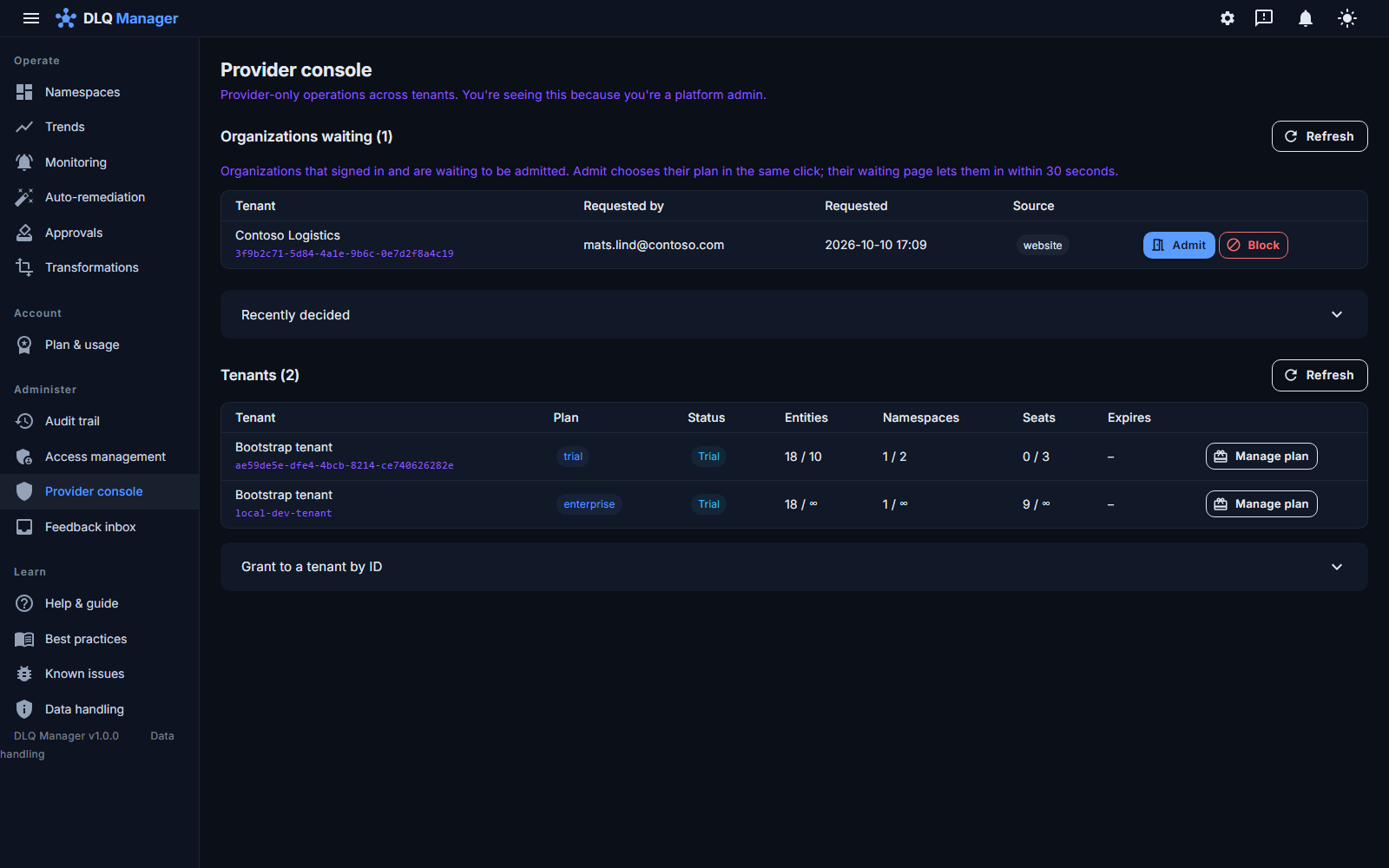
  • Waiting for us? You wait signed in, on a page that checks every thirty seconds and opens the door by itself the moment we admit you, with the plan chosen in the same click. We approve during Nordic business hours; the page keeps working without any mail arriving.
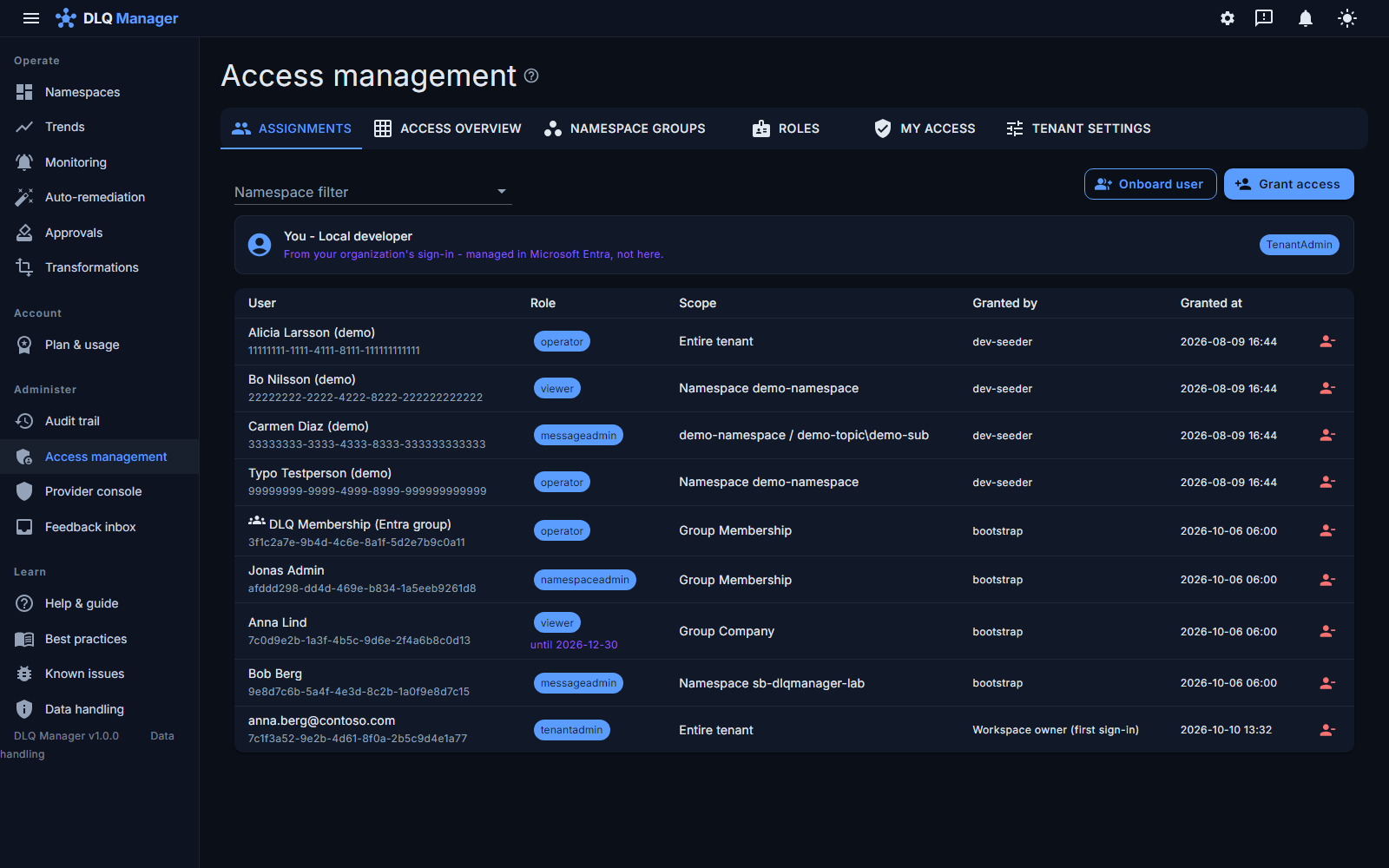
  • The first eligible user in is the owner - a signed-in person, never an application token. Shown in Access management as Workspace owner (first sign-in), audited, revocable like any grant - and an organization that wants to pre-decide its admin still can, with an Entra app role.
  • Rather have the link mailed to you? The two-field form takes a work email and a company name; your email domain tells us which Entra organization you belong to, and nothing else is looked up.
The waiting page a signed-in user sees while their organization is being admitted: 'We're setting up your organization', checks every thirty seconds, Check now and Sign out buttons
Waiting happens inside the product, signed in - and ends by itself.
The consent-blocked sign-in page: three numbered steps (Request approval, send the approval link, sign in again), what the admin approves, the approval link with Copy link and Email your admin buttons
When an Entra admin has to approve first: three steps, the link ready to copy or mail, and what is being approved.
Access management listing the organization's grants, the last row anna.berg@contoso.com as tenantadmin on the entire tenant, granted by 'Workspace owner (first sign-in)'
The first sign-in became the administrator - visible, audited, revocable.
The provider console's 'Organizations waiting' table with Contoso Logistics requested from the website, and Admit and Block buttons
Our side of it: who is waiting, admitted with their plan in one click.

Passwordless onboarding - no connection strings with Entra RBAC

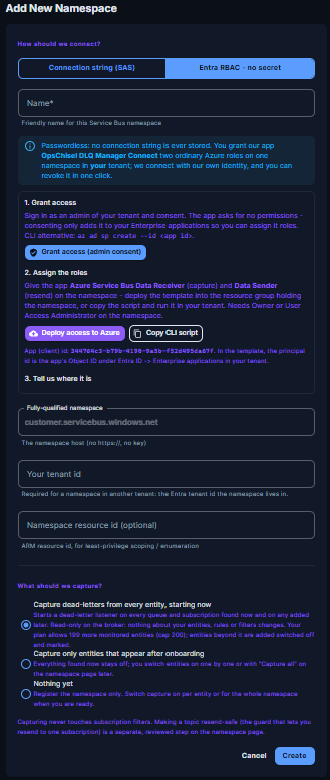
Connect a Service Bus via Entra ID RBAC from your own tenant: the wizard walks you through consenting the OpsChisel DLQ Manager Connect app, assigning it Service Bus data roles on one namespace (a Deploy-to-Azure button or a copyable script), and naming the host. On this path OpsChisel never sees, asks for or stores a connection string or secret - the app itself has no password or certificate, only a federated trust in our managed identity. A connection string remains available for namespaces that cannot use RBAC; it goes to Key Vault, never to a browser.

  • Access is a role assignment in your tenant - grant it in minutes, revoke it yourself without asking us.
  • Every connection to your namespace, and every telemetry read, uses a token issued in your tenant - never a shared platform identity.
  • Nothing to rotate, vault or leak. Your security team will ask; you'll enjoy answering.
  • Multi-tenant by design: each customer's data is isolated end-to-end.
The add-namespace wizard in Entra RBAC mode: grant the Connect app consent, assign its roles with a Deploy-to-Azure button or a script, then name the host - no connection string stored

Buy it the way your procurement likes

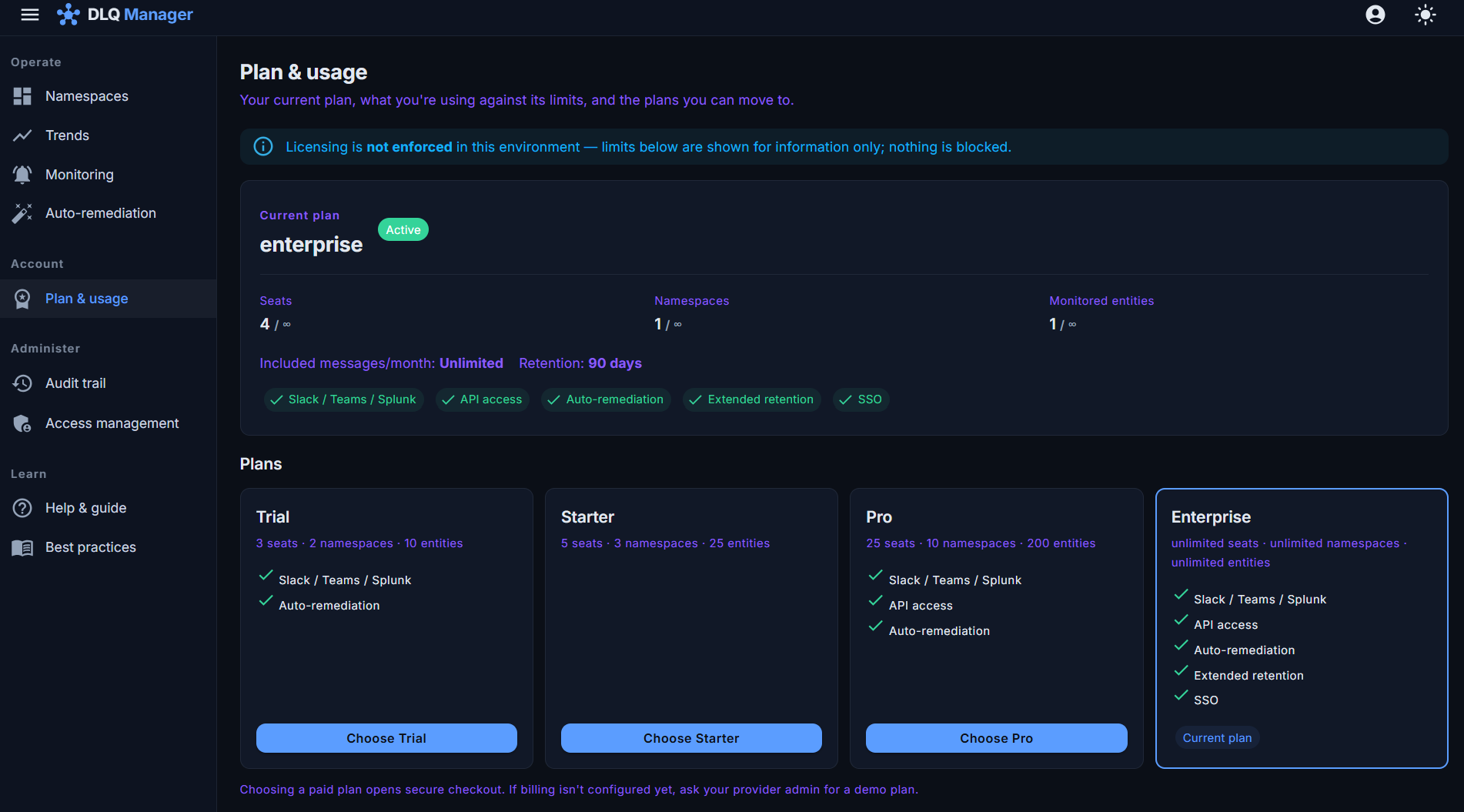
Self-serve plans are billed through Stripe; enterprises can transact through the Azure Marketplace - including private offers - so spend lands on your existing Azure commitment.

  • Start on a 30-day trial with everything unlocked.
  • Upgrade, downgrade or cancel from the app at any time. Independently, you can revoke OpsChisel's role assignment in your tenant whenever you like - that removes our access to your namespaces on the spot.
  • Run it in your own subscription (Enterprise, in validation) - the same product deployed into your Azure. Offline signed-license verification is built and tested as a library and is being integrated into the self-hosted deployment; it will be listed here as available once that integration has passed acceptance.
The plan & usage page: current plan with feature entitlements, plan cards for Team, Business and Enterprise, and upgrade actions

See your own dead-letters in it.

The tour is nice; your production data is nicer. Connect a namespace with Entra RBAC and OpsChisel starts capturing in minutes - free for 30 days.