Products · DLQ Manager · Billing

Billing that is as careful as the product

We built DLQ Manager so that no message is lost and every action is on record. Your subscription gets the same treatment: every change is applied once and never lost, compared with Stripe's or Microsoft's own record on a schedule we watch, and written to your audit log - and nothing about a payment problem ever touches your data.

Every applied change has a receipt

An upgrade, a renewal, a cancellation, a correction: each one lands in your audit log with the plan and status before and after, and the provider's own reference.

Applied once, never lost

Every notification from Stripe or Microsoft is stored the moment it arrives and finished even after an outage. A duplicate is never applied twice; an old one never overwrites a newer one.

A disagreement never costs you

If you upgrade through Azure Marketplace and Microsoft's records lag behind, you keep the plan you bought - its features, limits and retention - for 72 hours while we confirm it with Microsoft. Our team can extend that if Microsoft needs longer, never beyond six days in all. When it ends, we read Microsoft's record again: the plan Microsoft confirms is the plan you have, and the protection never lowers a plan you already hold.

A failed payment never costs your data

The workspace becomes read-only - you can still browse and export everything - and comes back by itself the moment the payment is sorted.

Your plan's history, in your own audit trail

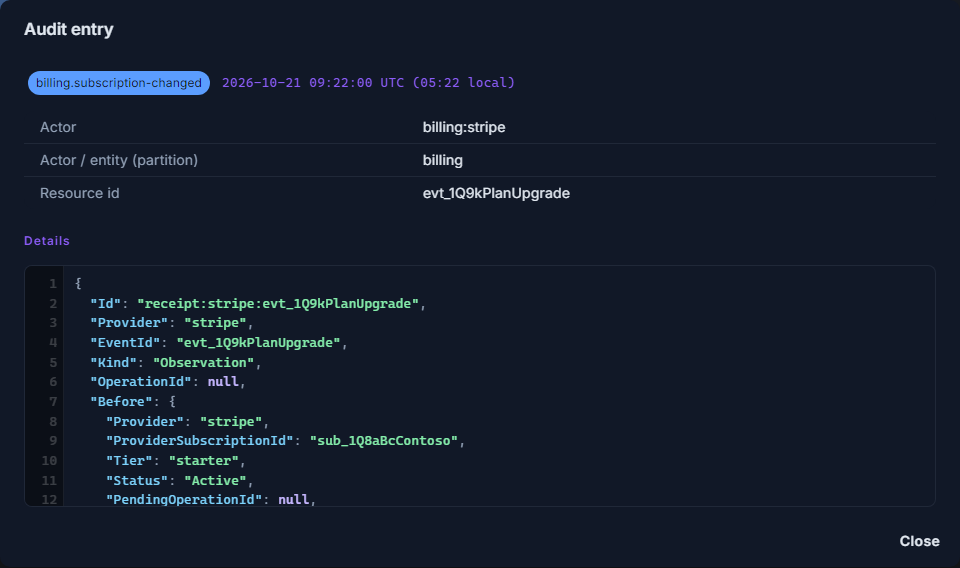
Finance asks when you moved to Pro. An auditor asks who changed the subscription. The answer is in the same audit trail as every resend and every access change: one billing.subscription-changed entry per applied change, with the plan and status before and after, the kind of change, and the Stripe or Microsoft reference to look it up on their side.

  • Written with the change, not after it. The new plan and its receipt are saved together - there is never a plan change without its record, or a record without its change.
  • Corrections are visible too. When the regular comparison finds a difference and corrects it, that correction gets its own entry, marked as a reconciliation.
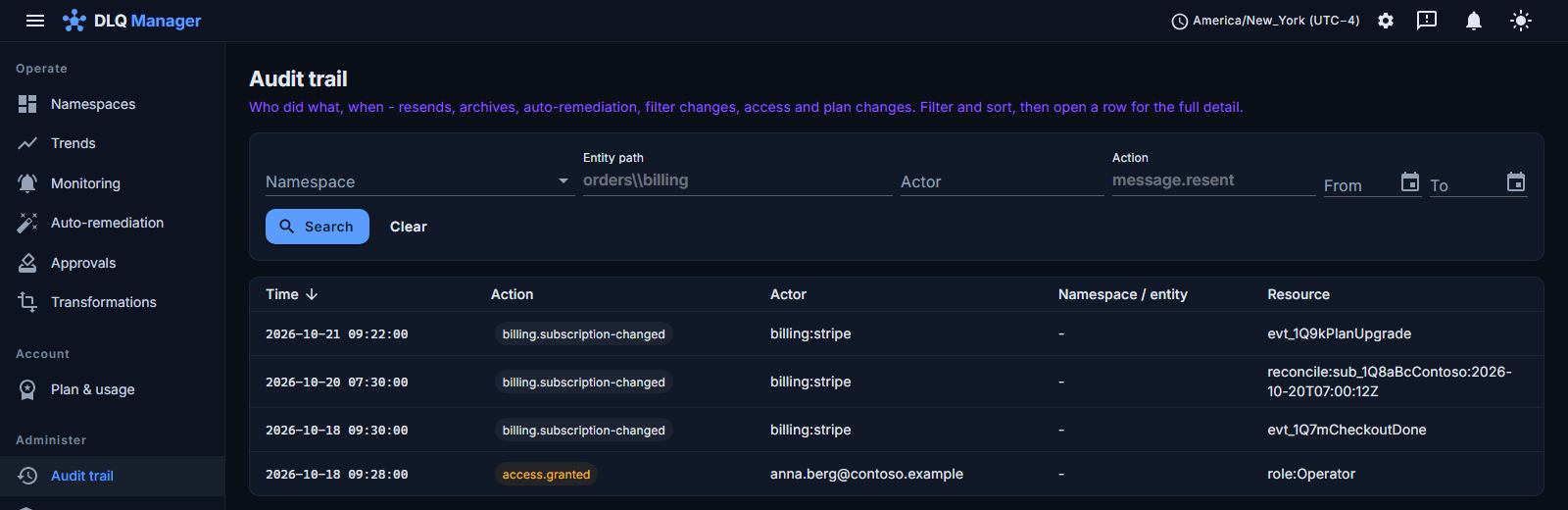
The Audit trail page of DLQ Manager with three billing.subscription-changed entries by billing:stripe - a plan upgrade, an hourly reconciliation and a completed checkout - above an access.granted entry, each with its time and the provider reference as the resource
Plan changes sit in the audit trail next to everything else your team does.
An audit entry opened: billing.subscription-changed by billing:stripe with the resource evt_1Q9kPlanUpgrade, and its details - the receipt id, the provider, the event id, the kind Observation, and the subscription before (Starter, Active) and after
Open an entry for the receipt: what the subscription was before, what it is after, and the provider's reference.

A payment problem is a pause, not a loss

Cards expire and invoices get stuck in approval. When Microsoft suspends an Azure Marketplace purchase because a payment did not go through, DLQ Manager tells everyone in the organization what happened and exactly where to fix it - in the Azure portal - and switches the workspace to read-only.

  • Nothing is deleted. Captured dead-letters, namespaces, rules and settings stay exactly as they were, and can still be browsed and exported.
  • Nothing to undo. The moment Microsoft reinstates the purchase, the workspace is fully back - no ticket, no re-onboarding.
  • Your subscription stays yours. A suspended purchase still holds the organization's place, so no other purchase can take it over in the meantime.
The banner at the top of DLQ Manager: this organization's Azure Marketplace purchase is suspended by Microsoft (the payment did not go through); update the payment method in the Azure portal, it is restored automatically when Microsoft reinstates it; the workspace is read-only - captured dead-letters can still be browsed and exported
What everyone in the organization sees - in English, Swedish or Norwegian - with the one place to fix it.

Behind the scenes: nothing is left to chance

Payment providers send their messages over the internet, and the internet drops things. So we do not rely on a message arriving. Every notification is stored the moment it arrives and finished with retries. Every hour we compare subscriptions with what Stripe or Microsoft holds - a large account is covered over several of those passes, and we are alerted if a complete comparison has not finished within three hours - and any difference is corrected from a fresh read of their record.

  • A person is told within the hour. Anything that cannot finish by itself within 60 minutes reaches our team, who see the reason and act on it - often before you notice anything.
  • Every action by our team is on record. Replaying a change, resolving it or extending a protection requires a written reason, and is recorded in your organization's audit log.
  • Never billed for nothing. If Microsoft or Stripe shows a live purchase that no organization holds, we find it and follow up personally. It is never attached to anyone automatically.
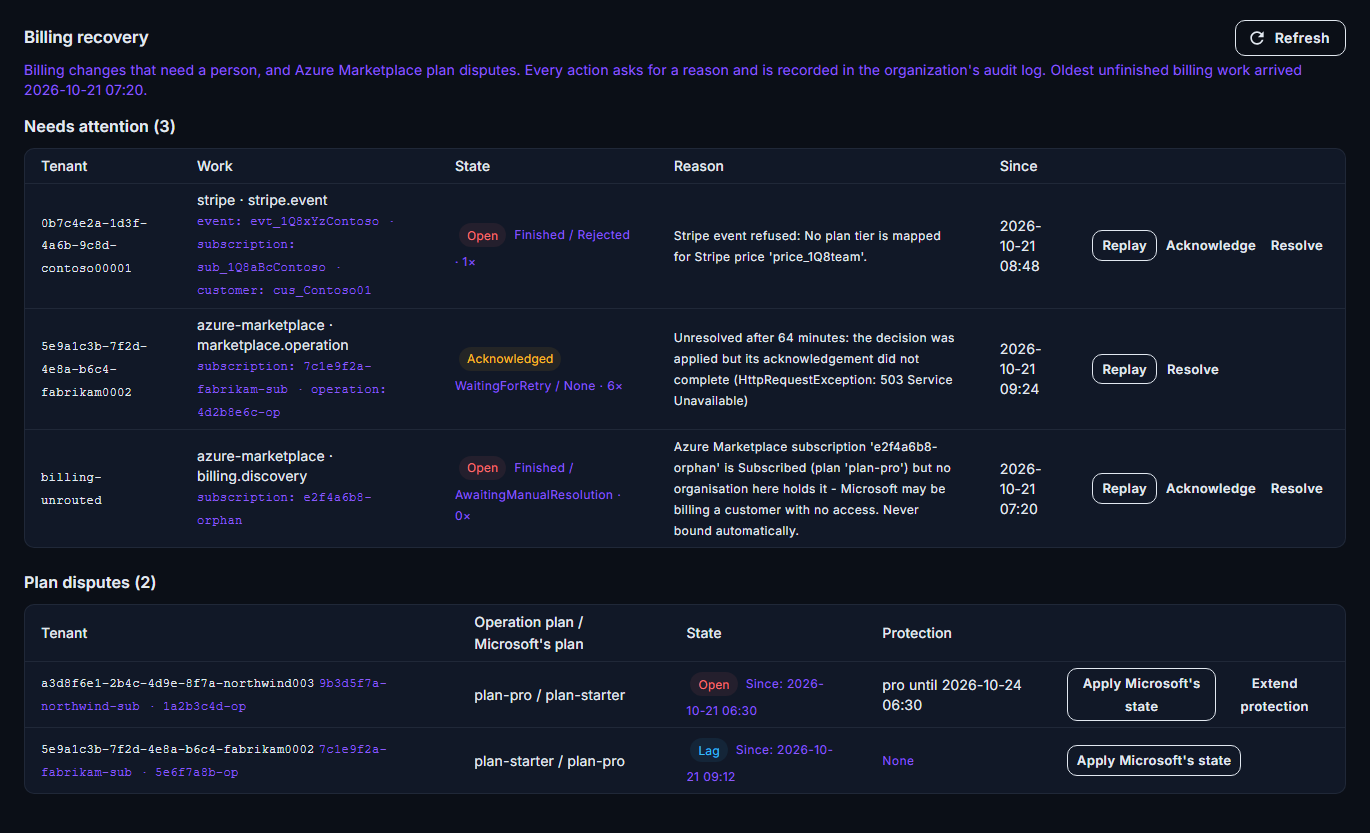
OpsChisel's own billing recovery console (example data): a Needs attention table with a Stripe price that is not mapped yet, an Azure Marketplace confirmation that is being retried, and a live Marketplace purchase no organization holds; below it, Plan disputes - one open with the Pro plan protected for three days, one still inside its first hour - with the actions Replay, Acknowledge, Resolve, Apply Microsoft's state and Extend protection
What our team sees (example data): every billing change that needs a person, and every plan disagreement with Microsoft and its protection.

Buy it the way your procurement likes

  • Self-serve with Stripe - start a 30-day trial with everything unlocked, then upgrade, downgrade or cancel from the app.
  • Through the Azure Marketplace - including private offers, so the spend lands on your existing Azure commitment. Plan changes made in the Azure portal apply within seconds.
  • Either way, the same guarantees - applied once and never lost, compared with the provider's record on a schedule we watch, a receipt in your audit log.

See the plans on the pricing page, or read each change as it shipped in what's new.

Careful with your messages. Careful with your money.

Connect a namespace and try everything free for 30 days.