OpsChisel DLQ Manager for Azure Service Bus - now in early access
Dead-letter queues, on autopilot.
OpsChisel continuously captures every Azure Service Bus dead-letter into durable, searchable storage - then lets you browse, repair, resend and auto-remediate them across all your namespaces, from one pane of glass.
30-day free trial · Sign in with your Microsoft work account · No credit card
The problem
Dead-letters pile up silently - and Azure Monitor won't fix them
Every poisoned payload, missed schema change and downstream outage lands in a dead-letter queue. Azure Monitor can tell you a number went up. It can't show you the message, let alone fix it.
You can't see inside
Metrics show counts, not messages. Answering "what actually failed?" means ad-hoc scripts and Service Bus Explorer sessions - one queue at a time, with nothing kept and no one else able to see what you saw.
Messages quietly expire
DLQs grow until quotas hit or TTLs silently discard business data. By the time someone looks, the evidence - and the revenue - may already be gone.
Recovery is manual and risky
Resending means hand-rolled tooling with no validation, no audit trail, and topic resends that fan out to every subscription. One typo becomes a new incident.
What you get
The full dead-letter lifecycle, in one product
Purpose-built for operating Service Bus DLQs - not a general observability tool with a queue chart bolted on.
Capture & search everything
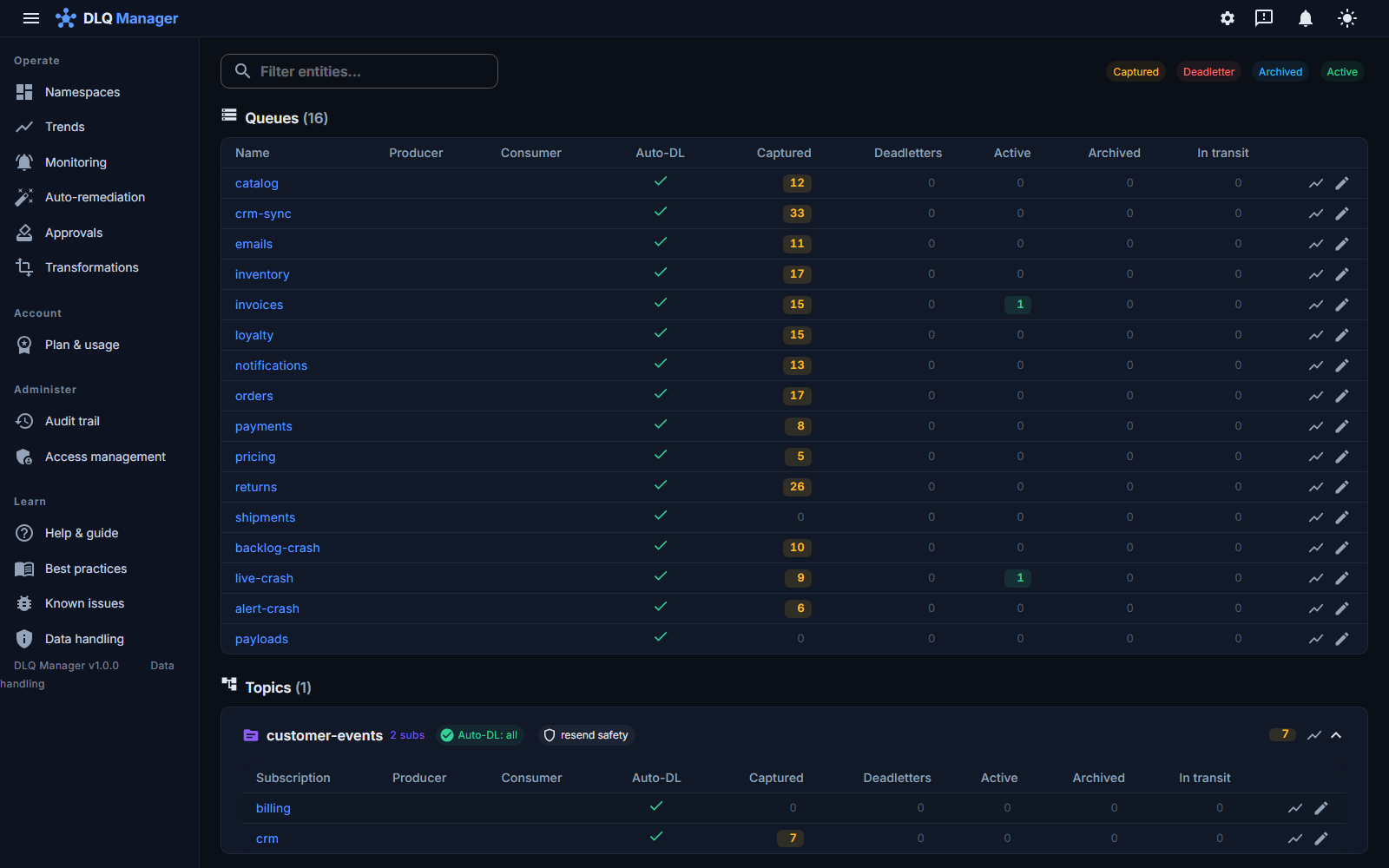
DLQs are continuously drained into durable storage and indexed - and the console updates live as they arrive. Search bodies, properties and reasons across every namespace at once.
Edit & resend
Repair the payload (JSON/XML validated before send), adjust properties, resend. The stored original is never touched, and every operator action on a message is written to the audit trail.
Auto-remediation
Rules auto-resend or auto-archive matching dead-letters. Dry-run by default, retry-ceiling loop guard, and it never auto-deletes.
Message-aware alerts
Slack, Teams, Splunk, email or SMS pings on dead-letter arrival or backlog thresholds - with retried delivery and one-click test-fire.
Failure-trend dashboards
Spot which entities fail, when and why, with per-entity drill-down from the trend line straight to the offending messages.
RBAC & audit trail
Built-in and custom roles, a read-only viewer for support teams, and an audit log of every resend, edit, archive and access change for compliance.
Diagnose the failure
Go past the reason code. A deterministic sibling-diff and delivery-pattern check name what's wrong, and an opt-in AI assistant that sends only the payload scope your administrator permits to the model endpoint configured for your deployment
See the consumer's real fault
Link your Application Insights and the consumer's actual exception and failed dependency appear next to the message, matched by trace id - so you know if it was the payload or the code.
Bulk resend & replay
Resend, archive or replay thousands of messages to the same or a different entity in one audited, restartable operation with live progress - now parallelized for big incidents.
How it works
From zero to operated DLQs in three steps
Connect - without secrets
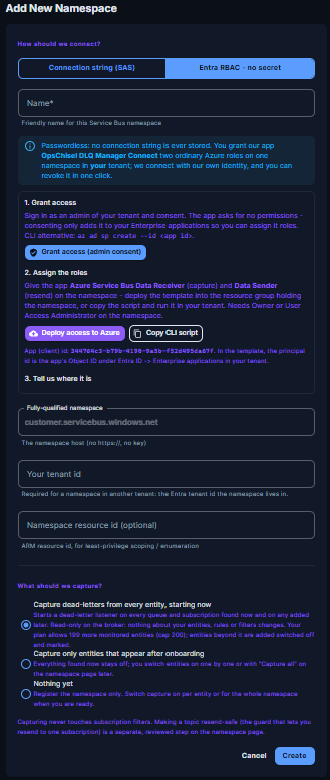
Grant the OpsChisel Connect app a role on your namespace with Entra RBAC - from your own tenant, in three guided steps. On this path no connection string or secret is stored; revoke access in your tenant at any time.
Capture & index
OpsChisel drains every dead-letter queue into durable storage and indexes it, so messages never expire unseen and search is instant.
Fix, resend, automate
Browse and repair messages, resend safely - even on topics - and turn recurring fixes into auto-remediation rules with a dry-run first.
Security first
Passwordless onboarding. No namespace credentials with Entra RBAC.
Most tools ask for a Service Bus connection string and keep it forever. OpsChisel connects through Entra ID RBAC: you grant the OpsChisel Connect app a role in your tenant and it presents a token issued there - across tenants, with no credential to leak, rotate or audit.
- Access is a role assignment in your tenant - revoke it in one click.
- Changes land in an append-only audit trail, with the coverage documented.
- Fine-grained roles decide who may view, resend, edit or administer.
- An edit never overwrites the original: each delivery keeps its hash and length, and its body where it was retained.
Proof, not promises
Measured on production-shaped load
Every number here comes from a published stress run against a production-shaped environment - auth on, plan limits enforced - and reconciled against Service Bus. No estimates, no rounding in our favour.
230,000+
dead-letters captured in a single session, reconciled to zero loss.
~16 RU
database cost per captured message, steady across eight runs.
25 ms
median namespace-stat response on the server during a 590 messages / second peak, clicks at 0.2-0.3 s end to end - a documented load test (run 14, October 2026), not an SLA.
0
messages lost across fourteen published runs. Write-side storage throttling at the per-tenant ceiling is absorbed by the capture pump; an operator read has never been throttled.
Stop babysitting dead-letter queues.
Connect a namespace with Entra RBAC - no connection-string secret to hand over - and see every dead-letter in one place within minutes. Free for 30 days.