Pricing
Start free. Scale when your queues do.
Per-product plans, one principle everywhere: a 30-day trial with everything unlocked - no credit card, no connection strings, cancel from the app at any time (and revoke our access in your tenant whenever you like).
DLQ Manager
DLQ Manager plans
Trial
The operational core plus the Business-tier automation, within trial-sized limits. Sign in with your Microsoft work account, connect a namespace and see your dead-letters in minutes - no credit card, no connection-string secret on the passwordless path.
- 30 days · 3 seats · 2 namespaces · 10 monitored entities
- Auto-remediation, advanced alert channels and AI-assisted diagnosis included
- Passwordless Entra onboarding
- Full audit trail from day one
- 7-day message retention; read-only after the trial, nothing deleted early
Team
Every day-to-day DLQ operation for a team running a handful of namespaces. You outgrow it by usage, not by missing buttons.
- Team-sized seats, namespaces & volume
- Live console, browse, search & edit-and-resend
- Bulk resend, archive & replay
- Targeted topic resend safety
- Failure diagnosis + consumer-fault root cause
- Slack, Teams & email alerts with test-fire
- Failure-trend dashboards
- Built-in roles + read-only viewer
- Full audit trail
Business
Adds the automation layer for platform teams running Service Bus at scale - plus more of everything.
- Everything in Team, plus:
- AI-assisted diagnosis & incident notes
- Auto-remediation rules (dry-run first)
- Retry-ceiling loop guard
- Splunk & SMS alert channels
- Custom RBAC roles
- Longer retention
- Azure Marketplace billing
- Priority support
Enterprise
For organizations with many tenants, compliance requirements and procurement standards. Everything, at your scale.
- Everything in Business, plus:
- Unlimited seats & namespaces
- SSO / Entra ID enterprise policies
- Audit export & retention controls
- Azure Marketplace private offers
- Custom volume & retention
- SLA + dedicated support
Early access: prices and exact limits will be announced at GA. Figures shown are indicative. Also available via Azure Marketplace.
How pricing works
You grow by usage - not by unlocking buttons
We gate as little as possible. Three principles decide what lands in which tier:
Usage scales every tier
Seats, connected namespaces, monitored entities, captured volume and retention grow as you move up. That's the main axis - most teams upgrade because they connected more, not because a feature was missing.
Operations & safety are never paywalled
Search, resend, edit-and-resend, bulk operations, topic resend safety, passwordless onboarding, RBAC basics and the full audit trail are in every tier. We don't sell seatbelts as an add-on.
Two honest feature gates
The automation layer (auto-remediation, Splunk & SMS channels, custom roles) starts at Business. Enterprise controls (SSO policies, audit export, private offers) sit in Enterprise - because that's who they're for. Email alerts are in every tier.
Compare plans in detail
The trial mirrors Business - you evaluate the real thing, not a demo tier.
| What's included | Trial | Team | Business | Enterprise |
|---|---|---|---|---|
| Usage & scale | ||||
| Seats | 3 | Team-sized | Department-sized | Unlimited |
| Connected namespaces | 2 | A few | Many | Unlimited |
| Monitored entities | 10 | Starter cap | Higher cap | Custom |
| Captured message volume | Trial limits | Standard | High | Custom |
| Message retention | 7 days | Standard | Extended | Custom |
| Core DLQ operations - in every tier | ||||
| Browse & indexed search across namespaces | Included | Included | Included | Included |
| Live console - dead-letters & counts update in real time | Included | Included | Included | Included |
| Resend & edit-and-resend (validated payloads) | Included | Included | Included | Included |
| Edit-locking for concurrent operators | Included | Included | Included | Included |
| Bulk resend / archive / delete | Included | Included | Included | Included |
| Redirect / replay to a different entity | Included | Included | Included | Included |
| Versioned payload transformations before resend | Included | Included | Included | Included |
| Triage: owner, acknowledge, snooze, runbook | Included | Included | Included | Included |
| Targeted resend safety for topics | Included | Included | Included | Included |
| Immutable originals | Included | Included | Included | Included |
| Automation | ||||
| Auto-remediation rules (auto-resend / auto-archive) | Included | Not included | Included | Included |
| Dry-run simulation before arming | Included | Not included | Included | Included |
| Retry-ceiling loop guard | Included | Not included | Included | Included |
| Alerting & insights | ||||
| Slack, Microsoft Teams & email alerts | Included | Included | Included | Included |
| Splunk channel | Included | Not included | Included | Included |
| SMS channel | Included | Not included | Included | Included |
| Test-fire & retried delivery | Included | Included | Included | Included |
| "New failure cluster" alert (first time something new breaks) | Included | Included | Included | Included |
| Stalled-consumer alert (messages not moving) | Included | Included | Included | Included |
| Failure-trend dashboards with drill-down | Included | Included | Included | Included |
| Diagnosis & AI | ||||
| Delivery-pattern diagnosis (crash / lock-expiry / slow retry) | Included | Included | Included | Included |
| Compare a message with its healthy siblings (anomaly report) | Included | Included | Included | Included |
| Correlation timeline & failure clustering | Included | Included | Included | Included |
| Consumer-fault root cause (link your Application Insights) | Included | Included | Included | Included |
| AI "explain this dead-letter" (your own OpenAI-compatible endpoint) | Included | Not included | Included | Included |
| Explain a cluster + downloadable incident note | Included | Not included | Included | Included |
| Security & governance | ||||
| Passwordless onboarding (Entra RBAC, no stored secrets) | Included | Included | Included | Included |
| Built-in roles + read-only viewer | Included | Included | Included | Included |
| Full audit trail | Included | Included | Included | Included |
| Four-eyes approval for large resends / deletes | Included | Included | Included | Included |
| Data export & verified deletion | Included | Included | Included | Included |
| Custom RBAC roles | Included | Not included | Included | Included |
| Passwordless cross-tenant onboarding (Connect app) | Included | Included | Included | Included |
| SSO / Entra ID enterprise policies | Not included | Not included | Not included | Included |
| Audit export & retention controls | Not included | Not included | Not included | Included |
| Billing & support | ||||
| Self-serve billing (Stripe) | Not included | Included | Included | Included |
| Azure Marketplace | Not included | Not included | Included | Included |
| Azure Marketplace private offers | Not included | Not included | Not included | Included |
| Support | Community | Standard | Priority | SLA + dedicated |
Included Not included Early access: prices and exact limits will be announced at GA. Figures shown are indicative. Also available via Azure Marketplace.
Transparency
What happens when the trial ends
Nothing is deleted early, nothing is hidden, and nothing changes behind your back. The workspace becomes read-only and says so on every page - this is what it looks like.
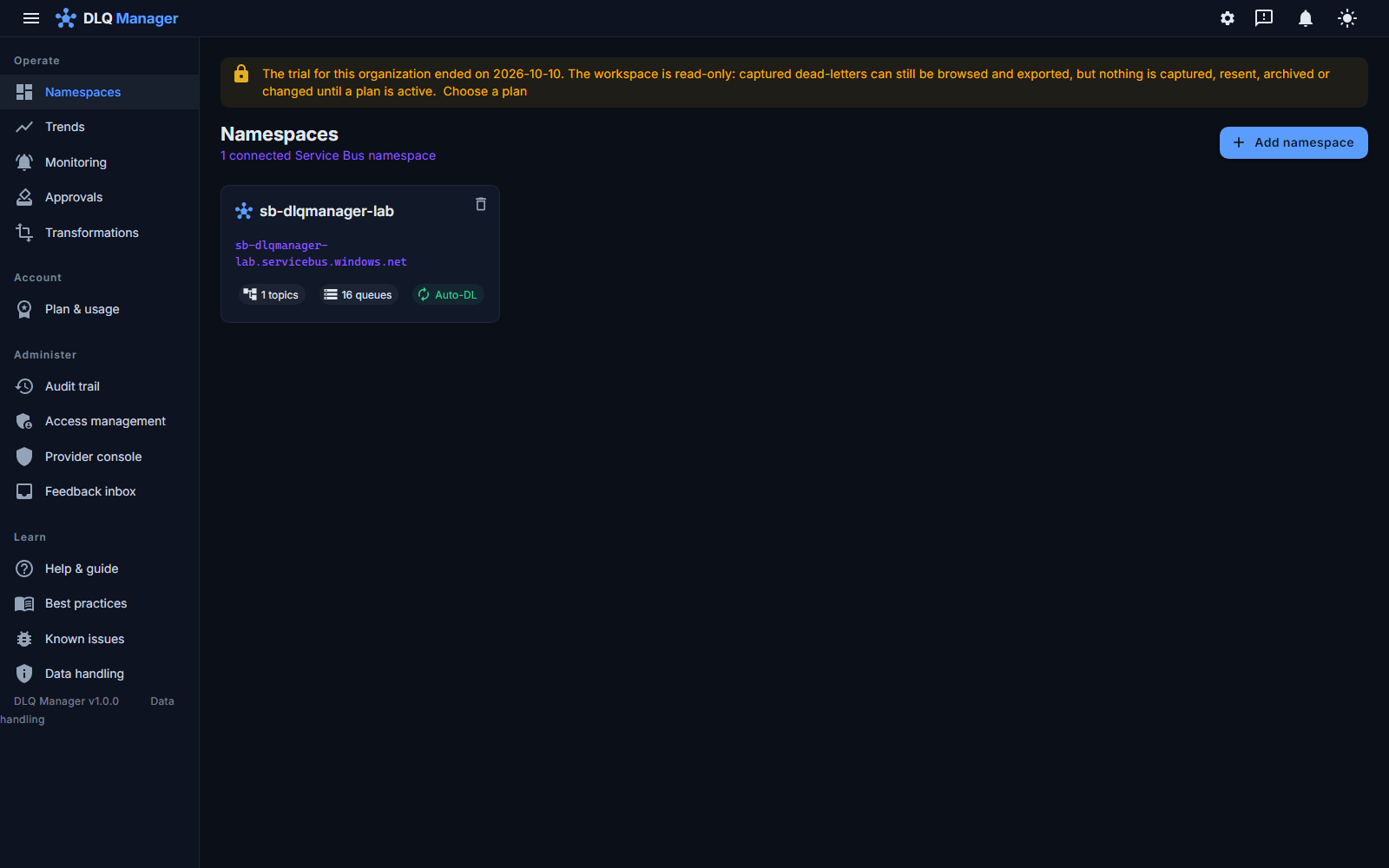
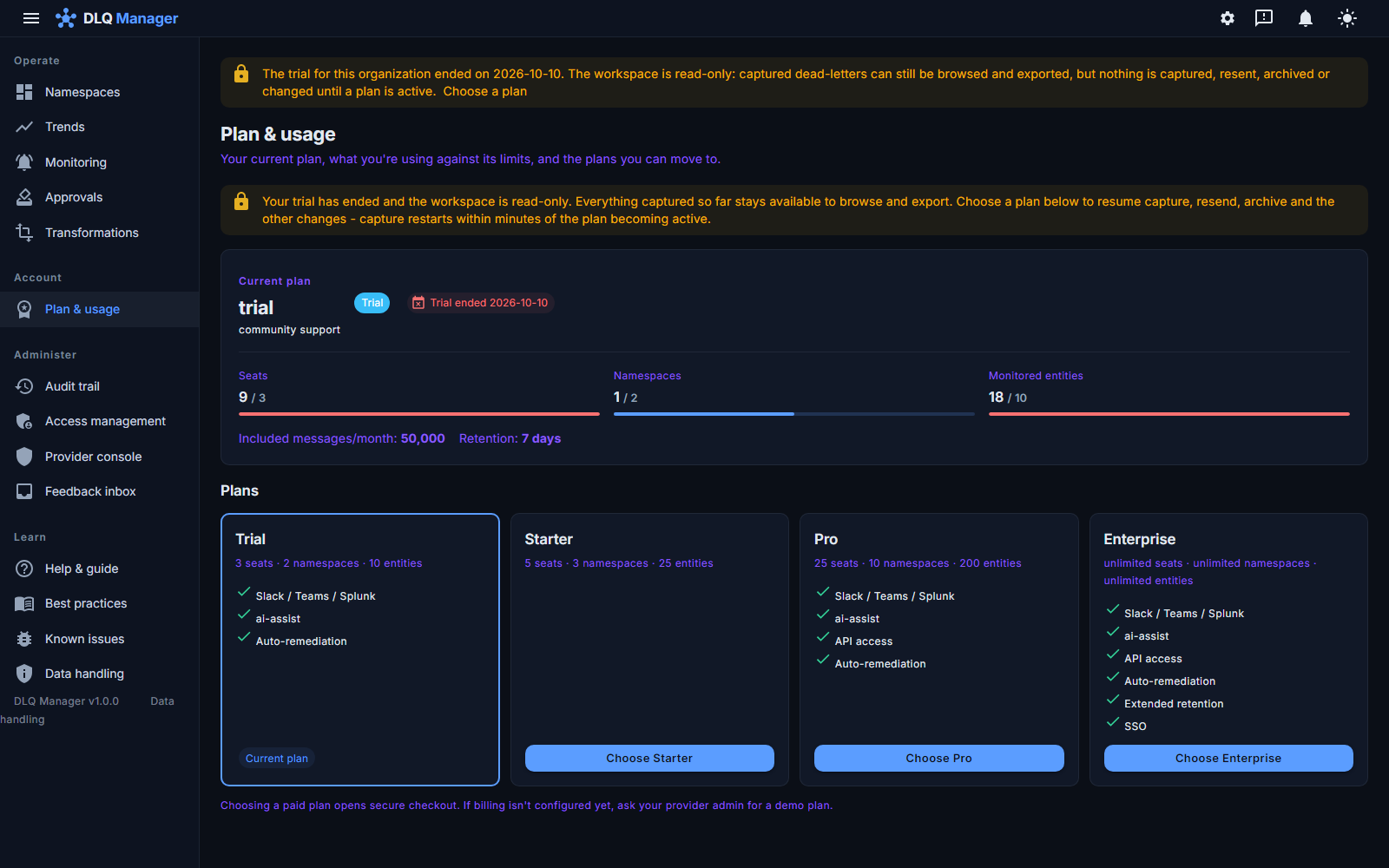
- Stops: capture (dead-letters stay in your own queues), resend, archive, delete, rules, automation, adding anything. Each refused action explains itself in the same words - never as an outage.
- Keeps working: browsing, search, payloads, the audit trail, trends and export of the retained messages - your data is yours to take with you. Retention is the plan's: seven days on the trial, up to 90 on Enterprise, counted from capture - so export before the retention window passes.
- Always open: choosing a plan, cancelling, removing a namespace, and leaving - everything that leads out of the lapsed state or out of the product. A plan becoming active restarts capture within seconds.
Foundry
Foundry Early access
Engineering-grade test data and load for Azure Service Bus. Pricing is announced together with availability - talk to us about early access.
More products are on the way.
Pricing questions, answered
What counts as a monitored entity?
A queue or a topic subscription whose dead-letter queue OpsChisel captures. You choose which entities are monitored - unmonitored ones cost nothing.
Why isn't auto-remediation in Team?
Automation acting on production messages deserves the maturity that comes with a scaled setup - and it's the point where OpsChisel starts replacing on-call time, not just tooling. Trial includes it, so you can evaluate it fully before choosing.
Is the AI assistant safe to turn on?
It's opt-in and off by default, on-demand only (never in the capture path), and it runs against the OpenAI-compatible endpoint configured for your deployment - your own Azure OpenAI or Azure AI Foundry endpoint under a dedicated deployment - and sends only the payload scope your administrator permits
Is security ever behind a paywall?
No. Passwordless onboarding, RBAC basics, the read-only viewer and the complete audit trail are in every tier. Enterprise adds organizational controls on top (SSO policies, audit export) - it doesn't unlock baseline security.
What happens when the trial ends?
Pick a plan, or do nothing. Capture pauses and the workspace becomes read-only: retained messages remain available to browse and export subject to the plan's retention period (seven days on the trial), and nothing is deleted early. A banner in the app says so and reminds you to export. A plan becoming active restarts capture within minutes - during early access, ask us to activate one.
Can we pay through Azure?
Yes. Business and Enterprise are available on the Azure Marketplace (Enterprise with private offers), so OpsChisel spend draws down your Azure commitment.
What if we blow past a usage limit?
We never stop capturing your dead-letters mid-incident. You'll get a heads-up and a grace period to move up a tier - no surprise overage bill.
Try it on your real queues.
Thirty days, every feature, no credit card. If it doesn't pay for itself in the first incident, revoke the role assignment and walk away.